Reducing Cart Abandonment Without Discounting Everyone
A shopper adds a coat to the cart, opens the checkout and stops. They were interested enough to click, so the product is probably not the problem — something between "I want this" and "I am paying for this" is unresolved. The Q4 reflex is to answer that with a discount at the cart. For most of the people who see it, that is the wrong instrument.
In short: reducing cart abandonment without discounting everyone
To reduce cart abandonment on Shopify without discounting everyone, you filter rather than broadcast: watch shopping behaviour, find the visitors who are still deciding, and give those shoppers a personal, time-limited code with a countdown. Skipping the visitors who read as ready to buy is what protects your margin.
Why do shoppers abandon a cart they were interested in?
Interest is not commitment. A shopper abandons a full cart because something is unresolved — the shipping cost, the delivery date, a size they are unsure about, or a decision they did not want to make on a phone. Only some of those are price problems.
Shopify reports abandoned checkouts as one list, which is useful for recovery emails and misleading for diagnosis. The causes are not one problem wearing different clothes:
- Cost discovered late. Shipping or fees that appear at the last step are a disclosure problem, and no code fixes them.
- Delivery uncertainty. "When will it arrive?" is a Q4 question with somebody's birthday attached. A clear date beats a percentage off.
- Fit and confidence. Sizing, dimensions and return terms; reviews and photos do more here than money.
- Trust in the store. A first-time shopper with no reviews is taking a risk they cannot price.
- Genuine deferral. Budget, a partner to consult, a payday next week — the group a time-limited offer speaks to.
Discounts address the last group whether or not the shopper was in it, which is the problem with broadcasting one. The confidence half has a cheaper answer: a sold counter without a popup.
What is wrong with discounting everyone?
A cart discount that reaches the whole store pays two costs at once. It pays the shoppers who were going to buy anyway, and it pays the shoppers who now learn to wait for the next code. The first cost is immediate; the second compounds.
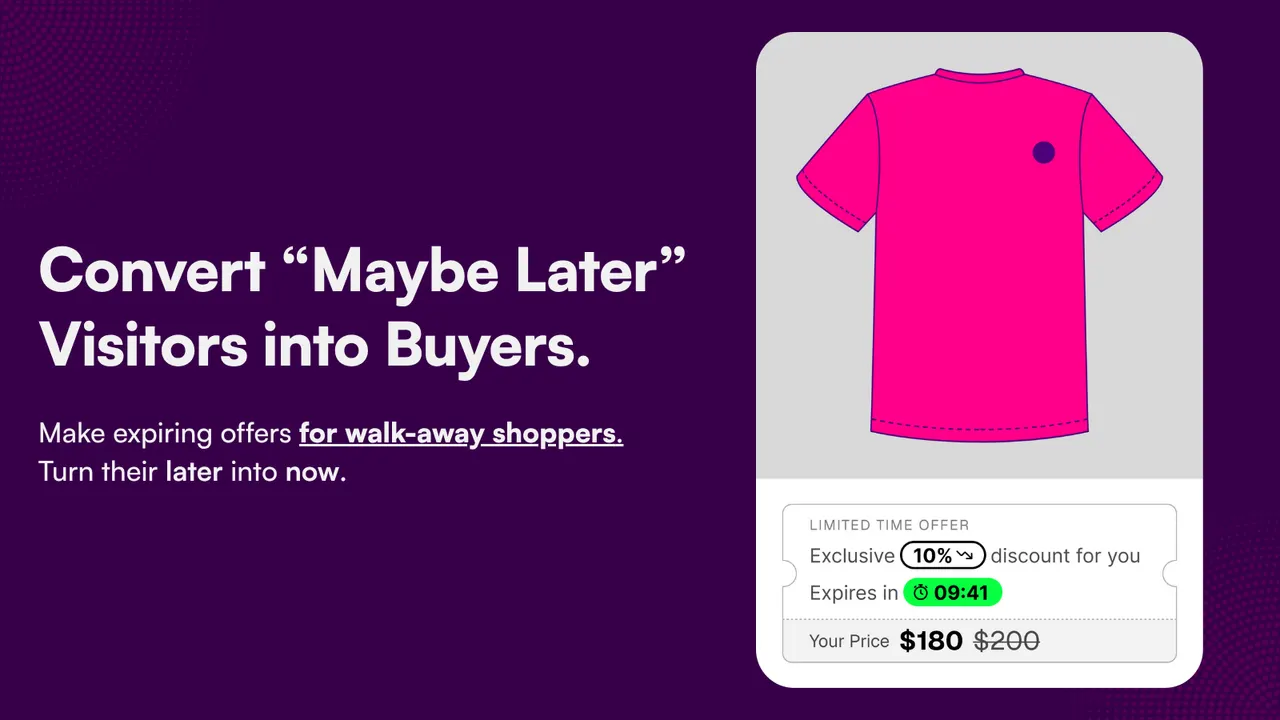
The arithmetic is simpler than most offer tools make it sound. A discount comes out of the part of the price that was profit, not the part that paid for the product, so a code that produces one extra order on a thin-margin item can cost more than the order earns. The screenshot below shows the shape: a personal ten per cent offer against a price moving from $200 to $180. That is real money leaving a real margin, which is why it should not be handed to someone who was not hesitating.
The second cost is the lesson: a customer who buys with a code learns to wait for the next one, and over a season that builds a base of shoppers who fill a cart and buy at whatever the follow-up email offers.
The honest limit of this argument: some shoppers really do need the price to move, and the claim is not that discounts are a mistake — it is that a discount should be a targeted cost with a reason, not a default you switch on because the abandoned-checkout list is long. The related temptation, a countdown that resets or a low-stock warning not tied to stock, trades a margin cost for a trust cost; how to show low stock honestly is the version worth copying.
How does a personalised, time-limited code work?
The visitor gets their own code rather than a public one, and it carries an expiry with a visible countdown. Growth Suite's listing describes each visitor receiving a personal, time-limited discount code with a countdown, while the app watches shopping behaviour to find the visitors still deciding.
Three details do the work:
- It is personal. A single-use code minted for one visitor cannot be posted to a coupon site or forwarded to a friend twice.
- It expires. The countdown is the reason to finish today rather than next week — and a deadline that restarts when the page reloads is not a deadline.
- It arrives while the decision is open. A recovery email lands hours later, often after the shopper bought somewhere else.
Caption: What the shopper sees: one code, their own, with a countdown and the price it produces. The offer is addressed to a single visitor rather than published to the store. (Image: Growth Suite)
The honest limit: any app that claims to know who is hesitating is inferring it from behaviour, and inference is not certainty. Ask what happens when someone closes the tab and returns the next day, and what the app records about visitors.
How do you decide who gets an offer?
Split the audience by intent. Visitors showing strong buying signals — moving straight through to checkout, returning to the same product, already past the point where price was in question — should get nothing, because an offer there only reduces what they were already going to pay.
Growth Suite's listing describes that filter directly: it watches shopping behaviour and skips the visitors it reads as ready to buy. That sentence is the differentiator worth testing any offer app against — a popup with a discount in it fires on a timer or an exit signal, and does not know who it is talking to.
If you set this up, decide a few rules and be able to say why each exists:
- What counts as hesitation? Time on the cart page, a return visit, an idle session, a repeated look at the shipping information.
- What counts as ready? Reaching payment, entering an address, arriving from a direct link into the cart. Those visitors should never see the offer.
- How does the offer end? One code, one expiry, no second chance on the same visit. A code that reappears three times is a discount with extra steps.
The honest limit: the filter will miss people and catch the wrong ones, and both errors are the price of not broadcasting; on most stores the first is cheaper than the second. A small store also gives the filter less behaviour to read, so expect it to matter more as traffic grows.
What about the rest of the offer toolkit?
A discount is one instrument among several, and the others are usually cheaper because they change what the shopper receives rather than what they pay — bundles, volume discounts, free gifts, add-ons and post-purchase offers move the order without rewriting the advertised price.
Growth Suite's listing describes all of them in the same app as the personalised codes: five tools in one place, sharing one view of the shopper instead of a stack of popups firing at the cart.
- Bundles and volume discounts raise the average order instead of lowering the price.
- Free gifts are the cheapest urgency when your margin sits in the product.
- Add-ons and post-purchase offers catch the moment after the card is charged, when the shopper is relaxed.
- A gamified popup is a different animal: not every discount popup is a plain coupon; PieceUp makes the shopper earn it, by completing a jigsaw for a real single-use Shopify code minted at the moment of winning.
Keep a discount in reserve: you can only spend margin once, and if a bundle would have produced the extra order, a code that produces it instead has cost you the difference.
How do you measure whether it worked?
Compare the visitors who saw an offer with the visitors who did not, on the same products in the same window. Whole-store revenue tells you nothing, because Q4 traffic is changing underneath it every week; what you want is conversion per visitor and the margin left after the code.
The trap is that both headline numbers can improve while the offer still loses money. Conversion goes up, because people who would have bought anyway bought with a code; margin per order goes down. Compare the two groups rather than the store, or the report looks like a success and the bank balance does not.
Two habits make it readable:
- Watch one product, not the store. Something with real traffic and a margin you would notice losing. Two weeks shows direction; a storewide average shows nothing.
- Keep a control group. You need people who were offered nothing to know what the offer changed. An offer tested against itself always wins.
This is also the unglamorous work worth doing before offers drive peak traffic: get your product media in order. Export Product Images exports product and variant images, videos, 3D models and the Files section as one ZIP, with filters by status, vendor, collection or date, and an emailed download link that lasts seven days. It sounds like a distraction until the week an offer drives traffic and somebody needs the original of a photo that is gone from the CDN.
Pairing proof with a deadline
Proof answers "do other people buy this?". A deadline answers "why now?". Together they give a hesitating shopper a reason to believe you and a reason not to wait.
The proof side is where we have a stake, so read it accordingly: we build SSM Sold Counter Social Proof. It shows real sold counts ("23 sold today", "140 sold this month"), best-seller badges ranked within a collection, live activity ("8 carted in the last hour") and live visitor counts — as labels on product images and grids, or as an inline Smart label beside Add to cart. Every figure comes from your own orders and live traffic, not from a field anyone types into, and a self-learning engine picks the strongest proof per product. The free plan covers up to 10,000 monthly visitors; the rating is 5.0 from one review, a thin sample.
The honest limit: proof you cannot point at an order for is worse than none, and a product with no orders has nothing honest to display.
A sold count says the product is moving; it does not say what happens if the shopper waits until next week. The label does the convincing and the offer does the closing. Reviews do the belief half too, and they compound: one written in October still works next October. Judge.me Product Reviews collects reviews, photo reviews, star ratings, testimonials and Google reviews, renders distribution charts, photo reviews, carousels and trust badges, and its free plan covers unlimited reviews.
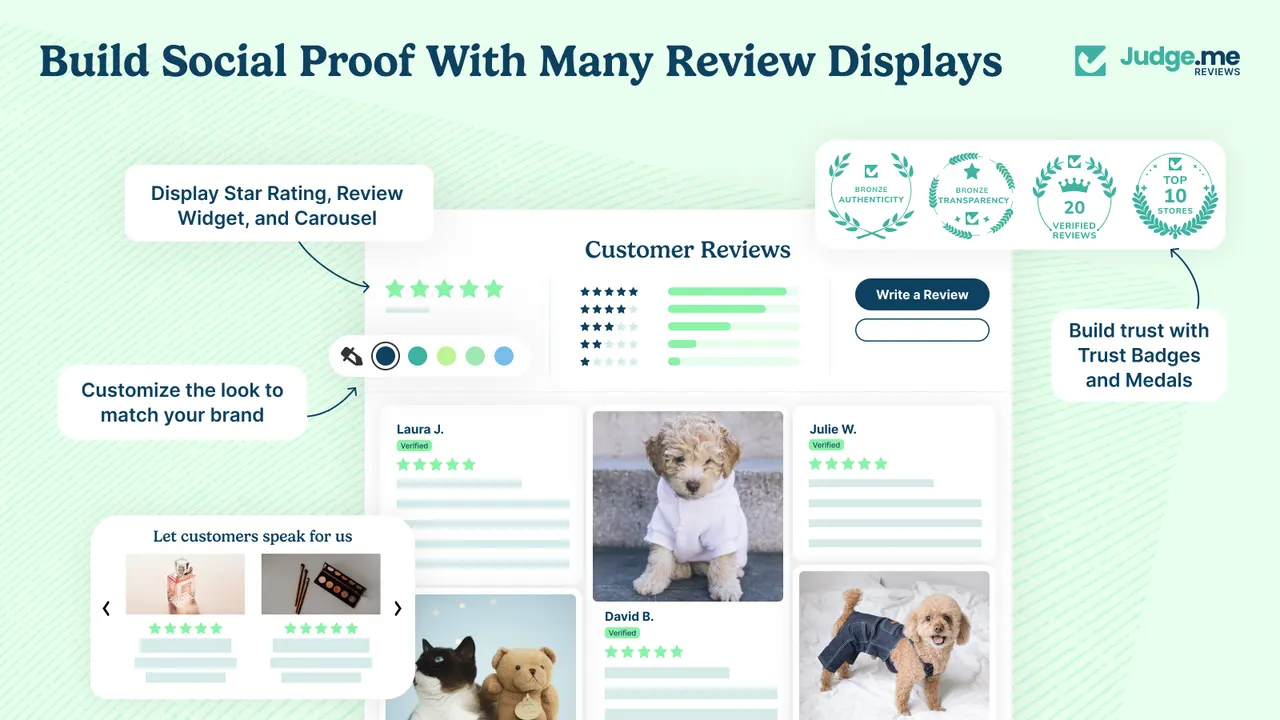
Caption: The evidence layer as Judge.me renders it: star ratings and a distribution chart above the reviews, photo reviews below, and trust badges beside them. Reviews answer a shopper who is unsure about the store rather than the price. (Image: Judge.me Product Reviews)
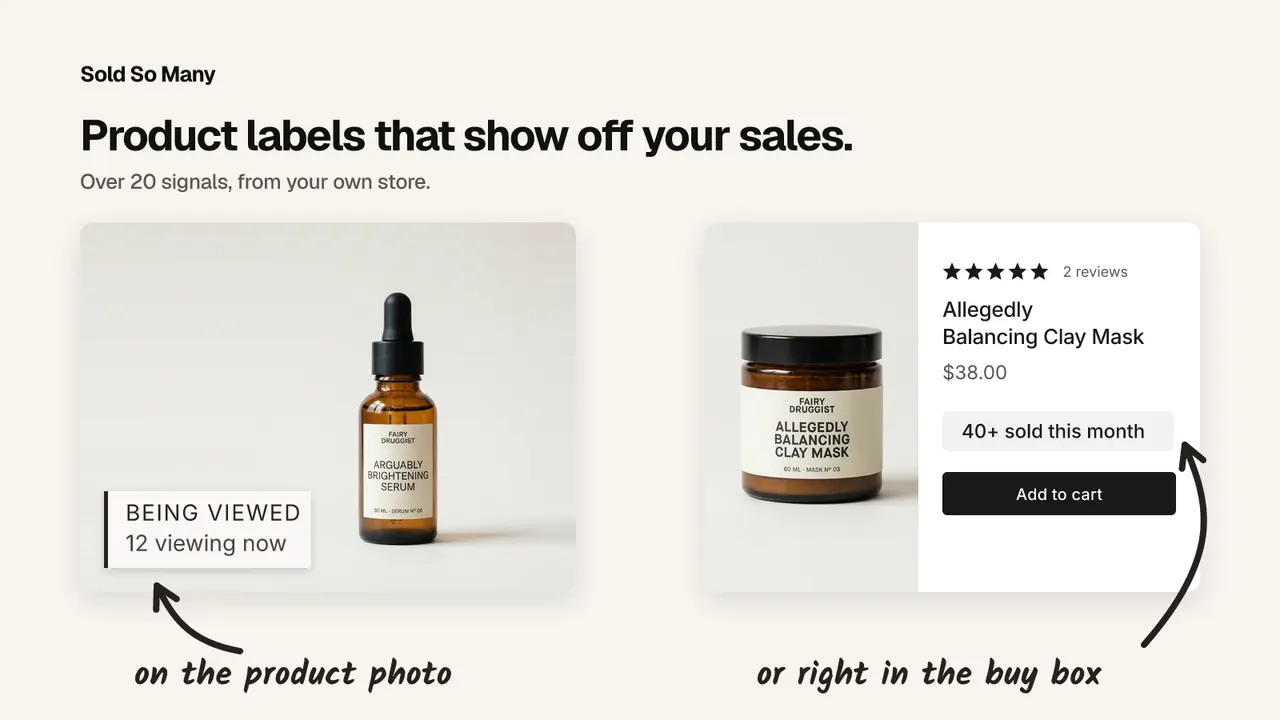
Caption: Proof in the two places it does different jobs: a live viewer label on the product image to stop the scroll, and a sold count beside Add to cart at the moment the decision is made. (Image: SSM Sold Counter Social Proof)
| App | Best for | Free plan | Rating |
|---|---|---|---|
| Growth Suite | Personal, time-limited offers for hesitating visitors | No, 14-day trial | Not shown |
| Export Product Images | Exporting product media as a single ZIP | Yes | 4.7 (31) |
| PieceUp | A gamified discount popup with real single-use codes | Yes | No reviews yet |
| SSM Sold Counter Social Proof | Real sold counts, badges and live activity as proof | Yes, up to 10,000 monthly visitors | 5.0 (1) |
| Judge.me Product Reviews | Reviews, photo reviews and star ratings | Yes, unlimited reviews | 5.0 (48,439) |
Growth Suite carries the Built for Shopify badge and, per its own description, is used by more than 300 stores in over 40 countries. It has no free plan — a 14-day trial — and its listing shows no rating.
The one thing to do this week: open the abandoned-checkout list, take the highest-traffic product on it, and decide which of the five causes above is driving those carts. If the cost is discovered at the checkout, fix the disclosure first. If the shopper is still deciding, that is where an offer belongs.
Frequently asked questions
How do I reduce cart abandonment on Shopify without discounting everyone? Fix the cheap causes first — shipping cost shown early, a delivery estimate, a checkout that works on a phone — then aim a time-limited offer only at the visitors who are hesitating. Skipping the shoppers who look ready to buy is what stops the offer paying for orders you would have had anyway.
Does a discount code actually reduce cart abandonment? Sometimes, and the result depends on who receives it. An offer shown to every visitor buys orders that were already going to happen and teaches repeat customers to wait for the next code. Aimed at hesitant visitors, it does the job it was meant to do.
How does Growth Suite decide who gets an offer? Its listing describes the app watching shopping behaviour to find visitors who are still deciding, and says it skips the visitors it reads as ready to buy. The ones it picks up receive a personal, time-limited code with a countdown rather than a public coupon.
Is a countdown timer on a discount code allowed? Yes, when the deadline is real. A code that genuinely expires is a deadline; a timer that restarts when the page reloads is invented urgency, and shoppers notice.
How long should an abandoned cart offer stay open? Long enough to be a decision and short enough to be a deadline — a countdown in hours rather than days. A code that never lapses is a permanent lower price, and full-price customers are subsidising the people who waited.
Credits and trademarks
Growth Suite is built by Growth Suite, Export Product Images by Craftshift, PieceUp by PieceUp, and Judge.me Product Reviews by Judge.me. We do not build any of them; SSM Sold Counter Social Proof is built by us, WeAreBooster. The Growth Suite and Judge.me visuals are promotional images from each app's own Shopify App Store listing, credited to its owner beside the image; they are not screenshots of a customer's store, and inclusion is not an endorsement by those companies of anything we build.
Shopify is a trademark of Shopify Inc. All other product names, logos and brands are the property of their respective owners and are used for identification only. Ratings and review counts were read from the App Store listings on 13 October 2026 and change over time.
Disclosure: we build SSM Sold Counter Social Proof, which is featured in this post. The other apps here are made by other teams, nobody paid for inclusion, and this post is part of a Q4 series written with the teams behind those apps.
Apps in this post
Growth Suite
Personalised, time-limited offers for shoppers who hesitate.
Export Product Images
Exports product and store media as a single ZIP.
PieceUp
A jigsaw discount popup that mints a real single-use Shopify code.
SSM Sold Counter Social Proof
Real sold counts, best-seller badges and live cart activity.
Judge.me Product Reviews
Collects product reviews, photo reviews and star ratings.
Related reading
- How to Show a Sales Counter Without a Popup
Social proof does not have to arrive as a corner toast. Here are the three places a sales counter can live on a Shopify page, and how to build each one.
- How to Show Low Stock on Shopify Without Making It Up
Something backed by what actually happened: how many times the product has sold out, when it was last restocked, how long it stayed gone, or a plain sold count.
- Is a Shopify Mobile App Worth It Before Q4?
It depends on one thing: whether your customers come back. What a Shopify mobile app builder does, what it costs, and who should skip it this Q4.