Shopify Product Page Custom Fields: Names, Photos, Fees
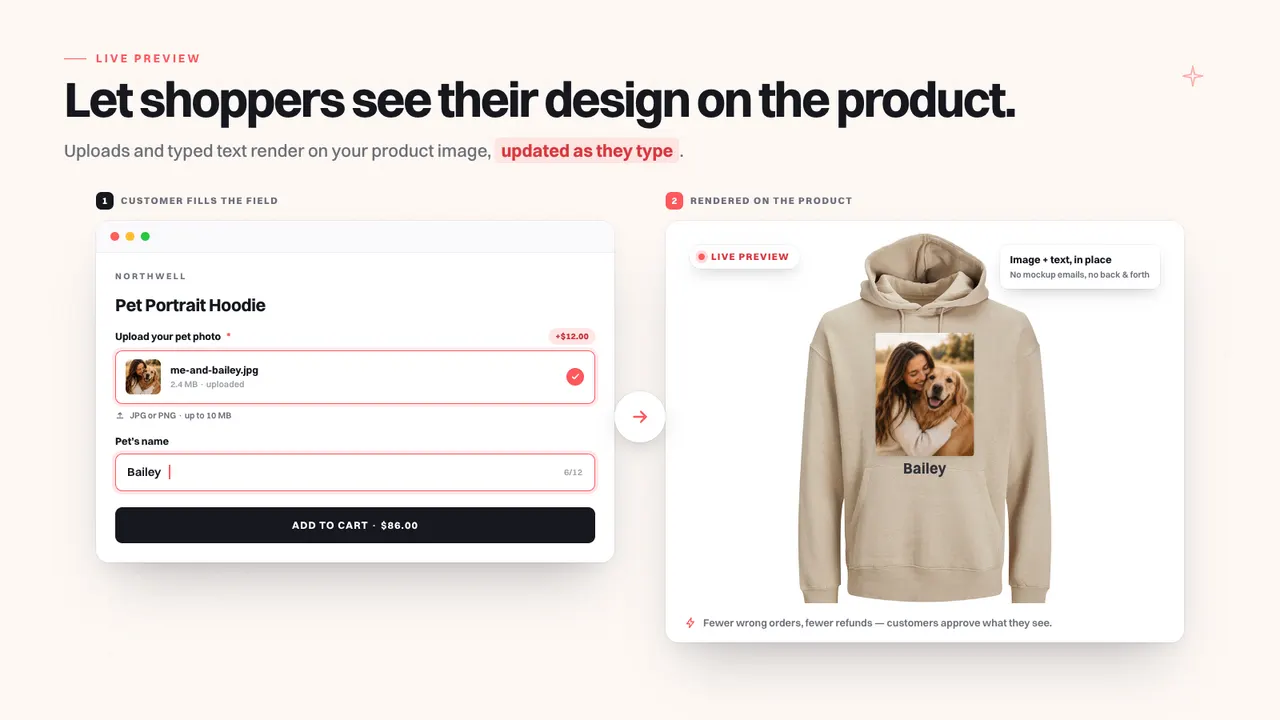
A shopper wants the hoodie with their dog's name on it. The variant picker handles the size and the colour; it has nothing to say about the name. So the name arrives some other way: a note at checkout, an email after the order, a message on Instagram.
That gap between what the product page can ask for and what the product needs is the job custom fields do. Here is what to collect, and where the answers should end up.
In short: custom fields on the Shopify product page
Custom fields add inputs to the Shopify product form so a shopper can supply what you need before checkout: a name, a date, a photo, a font, a colour. Mini: Custom Fields' listing describes ten input types, conditional logic, extra charges as their own cart line, and answers saved with the order. No code.
What happens when you collect personalisation by email?
Email turns personalisation into a matching problem. The shopper buys a generic product, then has to remember to send you the name or the photo, and somebody has to work out which order the message belongs to. The mistakes land after the money has been taken.
The failure modes are predictable:
- The message arrives with no order number, and somebody searches by name on a day when two customers share it.
- The message arrives on day four, after the item shipped on day two.
- The photo is whatever the phone produced. A soft photo printed on fabric reads as your mistake, not theirs.
Each costs somebody's time, and none of it shows up in a conversion report, which is why it survives for years.
Collecting the answer on the product page moves that work to the moment the customer is still paying attention, and attaches it to the order instead of a thread.
Which field types do you need?
Mini: Custom Fields' listing describes ten input types: text, dropdown, radio, checkbox, date picker, number, file upload, image swatch, colour swatch and font selector. Each one prevents a different mistake. Text takes a name; a date picker takes a date that cannot be typed ambiguously; a swatch takes a colour you can actually produce.
What each one is for, in practice:
- Text — the name, the initials, a short message, with a character limit you chose.
- Dropdown or radio — a long list such as engraving styles, or a short one where a single choice wins.
- Checkbox — a yes or a no: add a gift box, include a card.
- Date picker or number — a date that cannot be mistyped, or a quantity that is not the line quantity.
- File upload — the photo, the logo, the artwork: the field that replaces the email thread.
- Image or colour swatch — a choice made by looking, from what you actually stock.
- Font selector — the shopper sees the typeface instead of reading its name and hoping.
Caption: The live preview in the Mini: Custom Fields listing: the shopper uploads me-and-balley.jpg (+$12.00) and types the pet's name Bailey on the left, and both render onto the hoodie as they type on the right. (Image: Mini: Custom Fields)
That preview is doing quiet work: a shopper who sees their own photo on the hoodie before paying is far less likely to be surprised later.
How do you show a field only when it is relevant?
Conditional logic reveals a field only when an earlier answer makes it necessary, and a field can be limited to certain variants. Ask whether the order is a gift, and only then ask for the message. Mini: Custom Fields' listing describes both, which is what keeps a form from reading like paperwork.
A long form costs orders. Every extra field is a decision the shopper has to make, and most of them did not come here to make it. The test is simple: if the answer is not needed to make this exact item, the field should not be in front of this shopper.
- Conditional logic. A gift message appears when "this is a gift" is ticked, and not before.
- Per-variant fields. A font selector belongs on the printed item, and should be absent from the colour or size that has no printing at all.
The honest limit: conditional logic is only as good as the questions you write, and it is easy to build a combination that makes no sense. Walk the form on a phone before you call it finished.
How do you charge extra for gift wrapping or rush delivery?
A fee should be its own line item in the cart, not a hidden addition to the product price. Mini: Custom Fields' listing describes extra charges such as gift wrapping and rush delivery going into the cart as their own line, so the shopper sees what the extra is for.
Putting the fee inside the product price looks simpler and causes three problems. A refund becomes a calculation instead of a line you remove. A storewide discount quietly applies to the fee too, unless you have checked that it does not. And the shopper cannot tell whether the $34 is the hoodie or the wrapping.
Its own line item fixes all three and makes the receipt readable: one line for the product, one for the personalisation, one for the rush. Rush is the fee most stores undercharge for: it is your week, rearranged.
If rush delivery is the reason a shopper decides today rather than next week, that is a deadline you created honestly, which is the same standard as how to show low stock without making it up.
Do the answers reach your team?
Only if the field belongs to the order rather than to a message. Mini: Custom Fields' listing states that every answer is saved with the order, so the name and the upload sit on the order your team packs from. That is what separates a custom field from a contact form.
A field that emails you is not a field; it is a second inbox with extra steps. When you compare apps, the question is not "does it collect the answer" but "where does the answer live after checkout".
- On the order in Shopify admin, visible to whoever picks and packs it.
- On whatever your team actually reads — a packing slip or production sheet. An answer that lives only in an app dashboard is one somebody misses at 6pm.
- In the order confirmation, so the customer catches their own typo before the item is made.
- In an export, if fulfilment happens in a spreadsheet or another system.
None of that is automatic just because a field exists. Verify it with the app's own team before switching a field on across the catalogue — a short trial on one product tells you more than a long feature list.
What about customers who shop in another language?
Mini: Custom Fields' listing says its fields are translatable, and it is the only app in this post whose listing states it. Your theme's own text is translated by your theme; an app's field labels are not, unless the app translates them. A label the shopper cannot read is worse than no field.
The shopper has found your store, read a product page, and now reaches a field labelled "Engraving text (max 20 characters)" in English. The product is right; the form is the part that no longer fits.
Translation here is narrower than translating a storefront: the field label, the placeholder, the help text and the options inside a dropdown or radio list. That is the text the shopper acts on, and the text most apps leave in the language of whoever installed them.
The honest limit: a translated field is not a translated store. If your product descriptions are only in English, translating the form removes one blocked step rather than solving the market.
Do personalised products still need reviews?
More than most, because the shopper is being asked to imagine the result. A photo review shows a finished piece that somebody else received, which is the closest thing to seeing their own before it is made. Judge.me Product Reviews collects reviews, photo reviews and star ratings, and has a free plan for unlimited reviews.
That matters in Q4: reviews are the one part of a product page you cannot write yourself, and the part that keeps working after a campaign stops. Judge.me's listing also shows a distribution chart, a review carousel, trust badges and testimonials. On a personalised product, the photo review is the one to look for: it shows the finished item rather than a mock-up.
Put the reviews where the doubt is: on a made-to-order product, right beside the fields. Will the engraving look like the preview, is the date right?
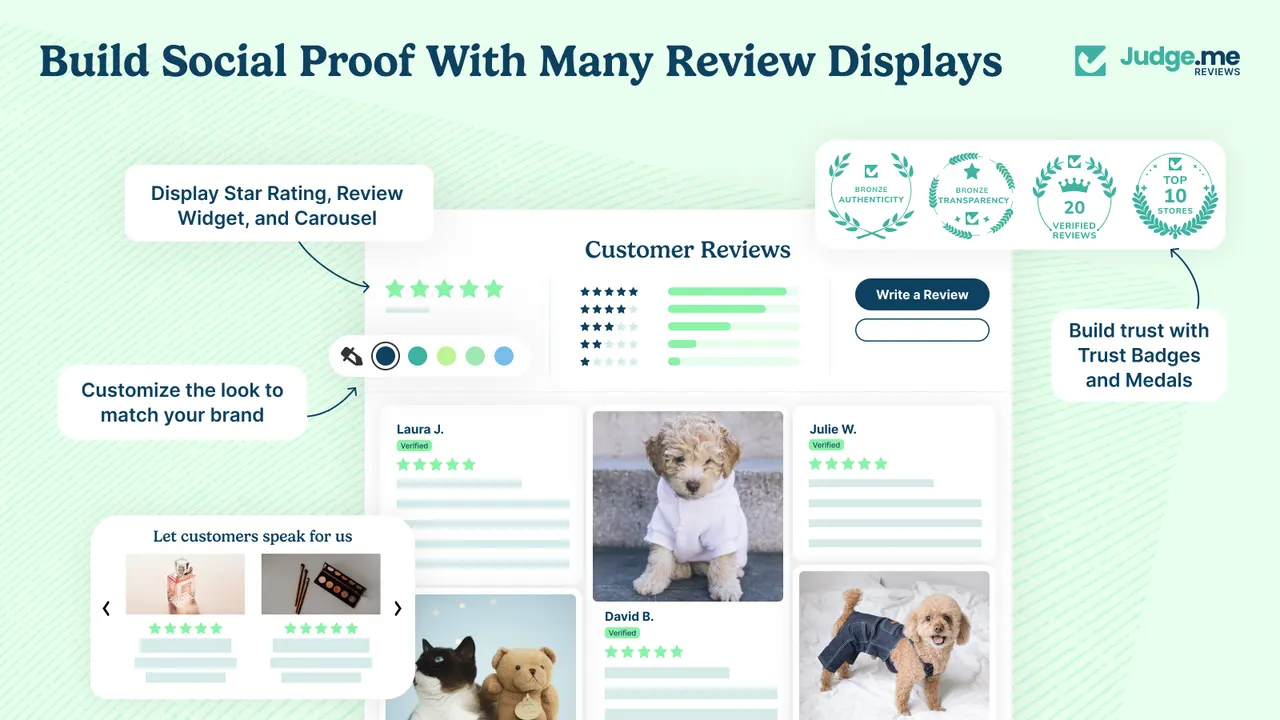
Caption: The evidence layer as Judge.me's own listing renders it: star ratings and a distribution chart at the top of the reviews, photo reviews below, trust badges beside them. (Image: Judge.me Product Reviews)
What to fix next
Fields solve what the page can ask for. Three jobs tend to appear in the same week: the shopper who configures an item and still hesitates, a promotion that needs a reason to take part, and proof that other people are buying.
- The shopper who has chosen a design and still not bought. Choice reduces doubt; it does not create a deadline. Growth Suite gives a visitor a personal, time-limited discount code with a countdown, and watches shopping behaviour to find visitors still deciding rather than firing a code at everyone. Its listing bundles volume discounts, free gifts, add-ons and post-purchase offers into one app. There is no free plan, the trial runs 14 days, and the listing shows no public rating, so we will not quote one.
- A promotion aimed at one personalised edit. PieceUp turns the discount popup into a jigsaw: the shopper drags the pieces, picks a prize, and receives a real single-use Shopify discount code minted at the moment of winning, visible under Discounts like any other code. You choose the image, the piece count from 2×2 to 4×4, the difficulty and whether there is a countdown. Free plan, no reviews yet.
- Proof that somebody else bought it. SSM Sold Counter Social Proof is the app we build: it shows real sold counts such as "23 sold today", best-seller badges ranked inside a collection, and live activity such as "8 carted in the last hour", on the product image, in a collection grid, or as the inline label beside Add to cart. Every figure comes from real orders and live traffic. The honest limit applies to all proof: on a product with no orders there is nothing to show, and showing a sales counter without a popup covers where that line sits.
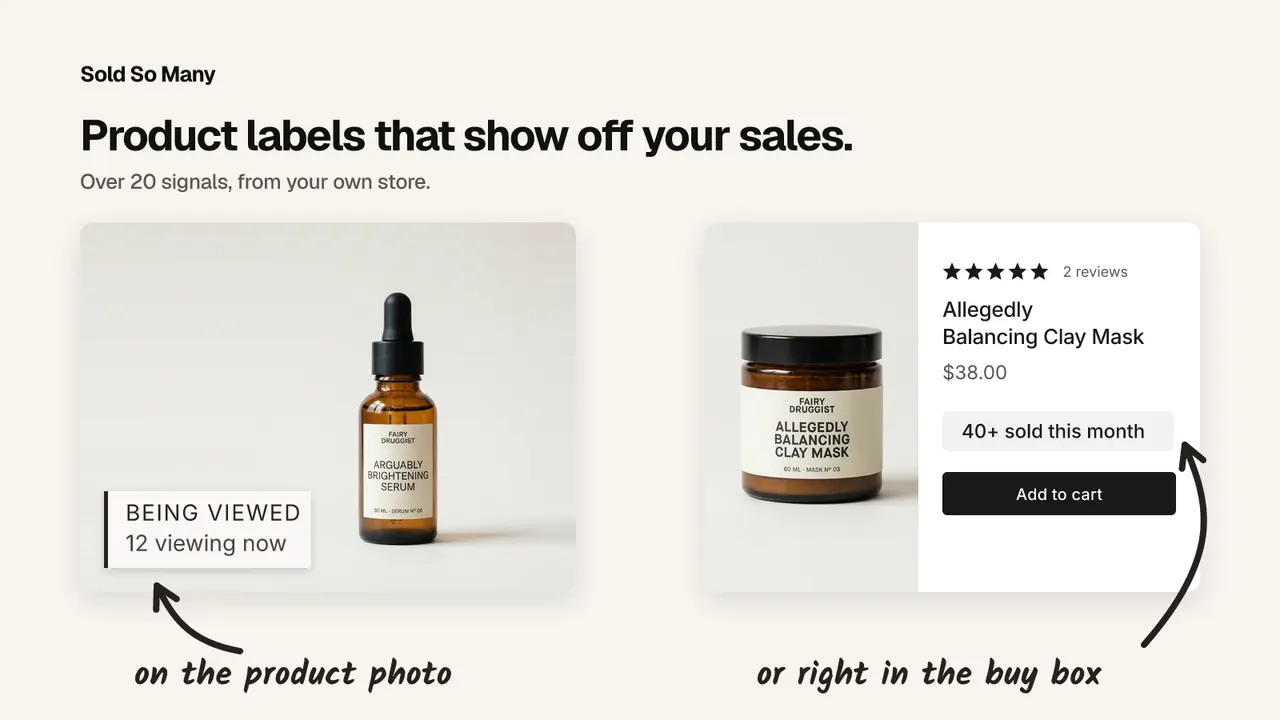
Caption: The proof layer from SSM's own listing: "BEING VIEWED — 12 viewing now" on the product photo, and "40+ sold this month" in the buy box beside Add to cart. (Image: SSM Sold Counter Social Proof)
| App | Best for | Free plan | Rating |
|---|---|---|---|
| Mini: Custom Fields | Names, photos, dates, fonts and fees on the product page | Yes | 5.0 (142) |
| Growth Suite | Personal, time-limited offers for hesitating shoppers | No, 14-day trial | Not shown |
| PieceUp | A jigsaw popup that mints a real single-use discount code | Yes | No reviews yet |
| SSM Sold Counter Social Proof | Real sold counts and live activity as proof | Yes, up to 10,000 monthly visitors | 5.0 (1) |
| Judge.me Product Reviews | Reviews, photo reviews and star ratings | Yes, unlimited reviews | 5.0 (48,439) |
Where to start
Pick one product that genuinely needs an answer, and add only the fields it cannot be made without. Place a test order on your phone, check that the answer and any fee land on the order, and read the confirmation the customer receives. Then leave it alone for a week.
Frequently asked questions
Can I add custom fields to a Shopify product page without code? Yes. An app whose theme embed or product-page block renders the inputs adds them to the product form, and the fields themselves are configured in the app. Mini: Custom Fields' listing states that no code is needed: the fields are added from the app and appear on the product page.
Do custom field answers show up on the order? They should, and it is the first thing to check. Mini: Custom Fields' listing states that every answer is saved with the order, so the name, the upload and the date sit on the order your team packs from. If an app emails you the answer instead, you are back to matching messages to orders by hand.
Can I charge extra for personalisation on Shopify? Yes, and the fee should be its own line item. Mini: Custom Fields' listing describes extra charges such as gift wrapping and rush delivery going into the cart as their own line, so the shopper sees what the extra is for.
Does a longer personalisation form cost me sales? Yes, which is why conditional logic matters. Ask the second question only when the first answer makes it necessary, and limit fields to the variants that need them. Every field shown to everyone is a field most shoppers have to read and skip before they can add to cart.
Can custom fields be translated for other markets? Mini: Custom Fields' listing says its fields are translatable, and it is the only app in this post whose listing states it. Labels, help text and option lists that follow the storefront language are the difference between a form a shopper completes and one they abandon.
Credits and trademarks
Mini: Custom Fields is built by Minimate; we do not make it. Growth Suite is built by Growth Suite, PieceUp by PieceUp, and Judge.me Product Reviews by Judge.me — none of those four is ours. SSM Sold Counter Social Proof is built by us, WeAreBooster. The visuals showing each app are promotional images from that app's own Shopify App Store listing, credited to its owner beside the image; they are not screenshots of a customer's store, and inclusion is not an endorsement of anything we build.
Shopify is a trademark of Shopify Inc. All other product names, logos and brands are the property of their respective owners and are used for identification only. Ratings and review counts were read from the App Store listings on 13 October 2026 and change over time.
Disclosure: we build SSM Sold Counter Social Proof, which is featured in this post. The other apps here are made by other teams, nobody paid for inclusion, and this post is part of a Q4 series written with the teams behind those apps.
Apps in this post
Mini: Custom Fields
Personalisation inputs on the product page, saved with the order.
Growth Suite
Personalised, time-limited offers for shoppers who hesitate.
PieceUp
A jigsaw discount popup that mints a real single-use Shopify code.
SSM Sold Counter Social Proof
Real sold counts, best-seller badges and live cart activity.
Judge.me Product Reviews
Collects product reviews, photo reviews and star ratings.
Related reading
- How to Show Low Stock on Shopify Without Making It Up
Something backed by what actually happened: how many times the product has sold out, when it was last restocked, how long it stayed gone, or a plain sold count.
- How to Show a Sales Counter Without a Popup
Social proof does not have to arrive as a corner toast. Here are the three places a sales counter can live on a Shopify page, and how to build each one.
- Is a Shopify Mobile App Worth It Before Q4?
It depends on one thing: whether your customers come back. What a Shopify mobile app builder does, what it costs, and who should skip it this Q4.