Shopify Discount Popups: Gamified vs Plain Compared
A shopper lands on your product page, reads the description, checks the price, and then a popup covers the screen: 10% off if you join the list. They type an email, copy the code, and leave without buying.
That is the plain discount popup, and it is not a bad tool. It has a very specific trade: you pay every shopper who accepts, and afterwards you cannot tell which of those orders you actually caused.
The alternative is the gamified popup, where the code sits behind a small game instead of an email field. This post compares the two honestly.
In short: what a gamified discount popup is
A gamified discount popup replaces the coupon box with a small game the shopper plays to win the code. In PieceUp that game is a jigsaw: pieces are dragged into place, a prize is revealed, and the app mints a real single-use Shopify discount code at the moment of winning, visible under Discounts like any other code.
The difference is not decoration. A plain popup hands 10% to anyone who scrolls past and asks for nothing back. A jigsaw asks for thirty seconds and gives the code to someone who just spent those seconds looking at your product.
What does a plain discount popup actually cost you?
Almost nothing to run, and a discount on every order that passes through it. A plain popup is fast, universally understood and frictionless: one click, the code goes to the clipboard, and the shopper is back at checkout. Its cost is that it discounts indiscriminately — you pay the shopper who needed a nudge and the shopper who was already going to buy.
That second group is the whole argument. Every order that touches the code carries the discount, and the orders that would have happened anyway are pure cost. You cannot separate the two afterwards, because the code does not record intent — it records that an order used it.
- The offer says nothing about you. A discount is the least distinctive sentence a store can say. Anyone selling something similar can match it before lunch.
- The measurement is usually a proxy. Check what your popup reports. If it counts impressions and copy-clicks, it is measuring interest, not revenue. Revenue per issued code is what decides whether the popup paid for itself.
Where the plain popup is the right answer. If your audience arrives ready to buy, if you are clearing stock, or if the offer is simple enough that explaining it costs more than giving it, a plain popup beats a puzzle.
If what you want is a reason to buy that is not a price cut, showing a sales counter without a popup covers that route.
How does the jigsaw mechanic work?
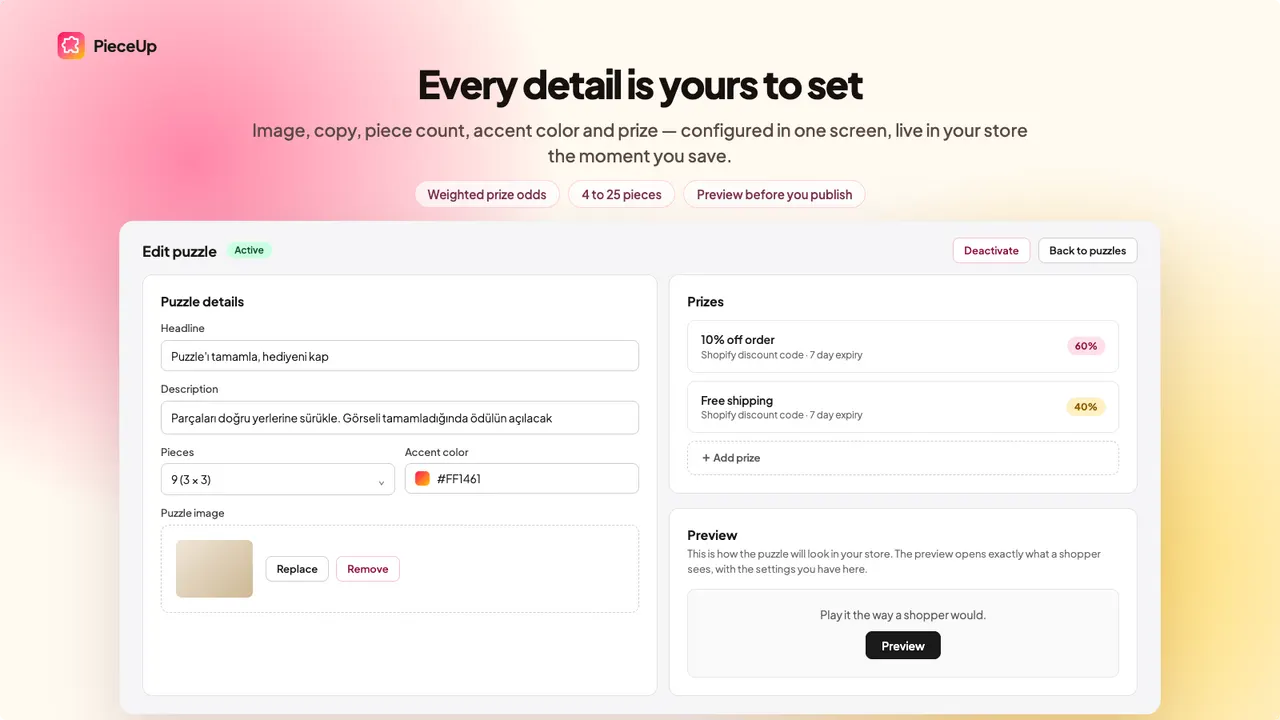
The shopper gets a scrambled image and drags the pieces into place. Completing it reveals the prize, and the app issues the discount code on the spot. PieceUp's editor holds the headline and description, the puzzle image, the accent colour, the piece count and the prize rows, with a Preview button before any of it goes live.
- The image. Whatever you upload, shown behind the grid. In practice that is a product shot, which is why the shopper finishes the puzzle with your product in their head.
- The piece count. The editor reads
9 (3 × 3), and the range runs from 2x2 up to 4x4, with three difficulty levels on top. - The prize rows. Each row is a reward with a weight. In the listing's own example, 10% off the order carries 60% and free shipping carries 40%.
Caption: PieceUp's own editor: headline and description, a 9-piece 3 × 3 grid, an accent colour, and prize rows carrying their weighted odds — 10% off order at 60%, free shipping at 40%. Those weights, not the discount headline, decide what the popup costs you. (Image: PieceUp)
Why the effort changes the economics. A prize that took work feels earned, and the larger effect is who receives it: the shopper who finishes a jigsaw is the one who stayed, so the code goes to them rather than to whoever happened to scroll.
The honest limit: a puzzle is friction, and some shoppers will not pay it. Anyone who wanted the code instantly and got a game is a lost conversion you will never see in the numbers. Dragging pieces is also fiddlier on a phone, which is where most Q4 traffic lands.
How do you keep control of the discount?
Every reward is a real single-use code created under Discounts at the moment the shopper wins, so it behaves like any other code you make: it cannot be reused, it can be limited, and it can be switched off. Everything else is a dial — what the prizes are, how hard the puzzle is, and how often it appears.
- Real codes, not coupons on a screen. The code lives in Shopify's own Discounts list, so it is auditable with the rest of your discounts and can be disabled like any other.
- Prize type. Percentage off, a fixed amount off, free shipping, or a "try again" that costs you nothing.
- Weighted odds. Each prize row carries a weight, so you choose the average reward per completion instead of discovering it afterwards.
- The try-again row. A shopper who does not win still gets an outcome, which beats a closed popup, and it lets you keep the value of the real prizes higher.
- Difficulty. 2x2 to 4x4, and three difficulty levels. A 2x2 is over in seconds, which suits a mobile audience in a hurry. A 4x4 buys more time with the product image, but only works if the prize justifies the wait.
- A countdown. Optional, and worth having only when the deadline is real. A timer that resets makes a store look dishonest.
- Product limits. The offer can be limited to chosen products. Do not put a code on the product that already sells without help.
- Trigger and frequency. A button, a delay, or both. All pages, product pages only, or the cart. Once ever, once a day, or unlimited.
The setting worth thinking hardest about is frequency: once ever is a reasonable default, because a shopper who has used the code cannot be won again by seeing it.
How do you know it worked?
PieceUp counts opens, completions and rewards for each puzzle, and an order placed with a code is matched back to the puzzle that issued it. That gives revenue per puzzle rather than clicks per popup — the only basis on which a discount can be judged, because it cost you margin.
Read the funnel as four numbers, because each gap means something different:
- Opens. How many shoppers saw the puzzle at all. A low number here is a trigger problem, not a game problem.
- Completions. How many finished it. The drop from opens to completions is the friction of the mechanic, and where the piece count shows up.
- Rewards. How many codes were issued, and which prize each got. This is where your weighted odds become an average cost per completion.
- Orders with a code. Attributed revenue. The drop from rewards to orders is the offer's problem or the checkout's.
The honest limit: matching an order to the code that produced it counts the orders that came through the code. It cannot count the shopper who played, closed the popup and bought at full price two days later, nor the orders that would have happened anyway. Attributed revenue is a floor.
Can you test two popups against each other?
Yes. PieceUp's Premium plan runs two puzzles against each other so you can keep the winner, and the discipline that makes it worth doing is changing one thing at a time — the piece count, the prize mix, the headline or the trigger — with both versions live at the same time.
Testing them together matters more than it sounds: Q4 traffic changes week over week, so a before-and-after comparison measures the calendar as much as the change. The first test worth running is the one this post is about: the same prize behind a 2x2 and behind a 4x4. If completions collapse at 4x4 without anything changing after, the extra friction bought you nothing. After that, test the prize mix, the headline, then the trigger.
The honest limit: splitting traffic in two halves the traffic each version sees, so a small store needs a long run to trust a difference. If you cannot run long enough to separate the two, ship the simpler one.
When urgency or proof beats a discount
When the hesitation is not about price. If the shopper is unsure whether the product is any good, or whether anyone else buys it, a discount answers a question they did not ask. Proof and urgency answer the question they did ask, and both are cheaper than a price cut.
The proof answer. SSM Sold Counter Social Proof is the app we build. It shows shoppers what other people actually did: real sold counts, best-seller badges ranked within a collection, live cart activity and live visitor counts. The labels sit on product images and collection grids, or inline beside Add to cart, and every figure comes from real orders and live traffic rather than a number typed into a settings screen. Free up to 10,000 monthly visitors, and 5.0 from 1 review — a start, not a track record.
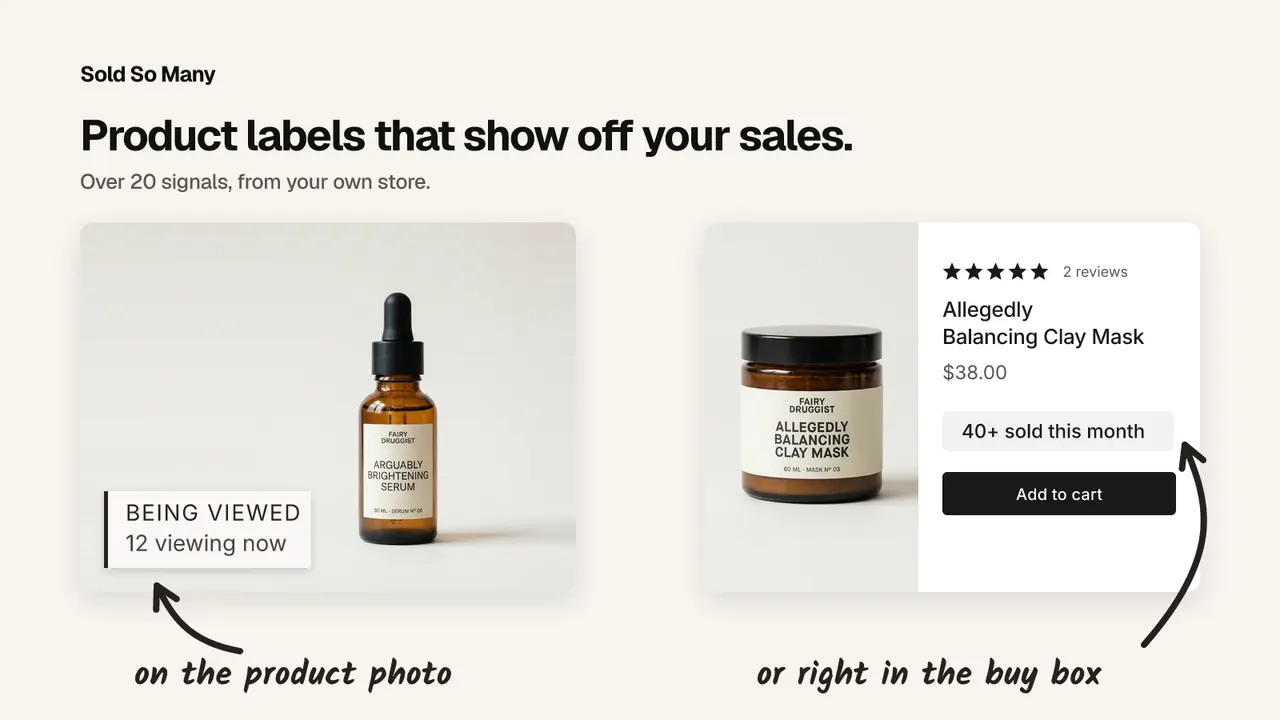
Caption: Proof from our own app's demo store: "BEING VIEWED 12 viewing now" over the product photo, and "40+ sold this month" beside Add to cart. (Image: SSM Sold Counter Social Proof)
The engagement answer. If you want engagement rather than a discount, a giveaway campaign earns attention without cutting price, and Giveaway Ninja is built around that: orders, referrals and social actions become entries, with extra entries per dollar spent, targeting for specific products or variants, and multipliers for launch day and the final hours. Entries stay visible while the shopper browses, through blocks on product cards, the product page, the cart, the checkout and the thank-you page, and the draw picks winners at random. Free for 50 monthly users, and 5.0 from 89 reviews — and check your own country's rules first, because legal constraints vary.
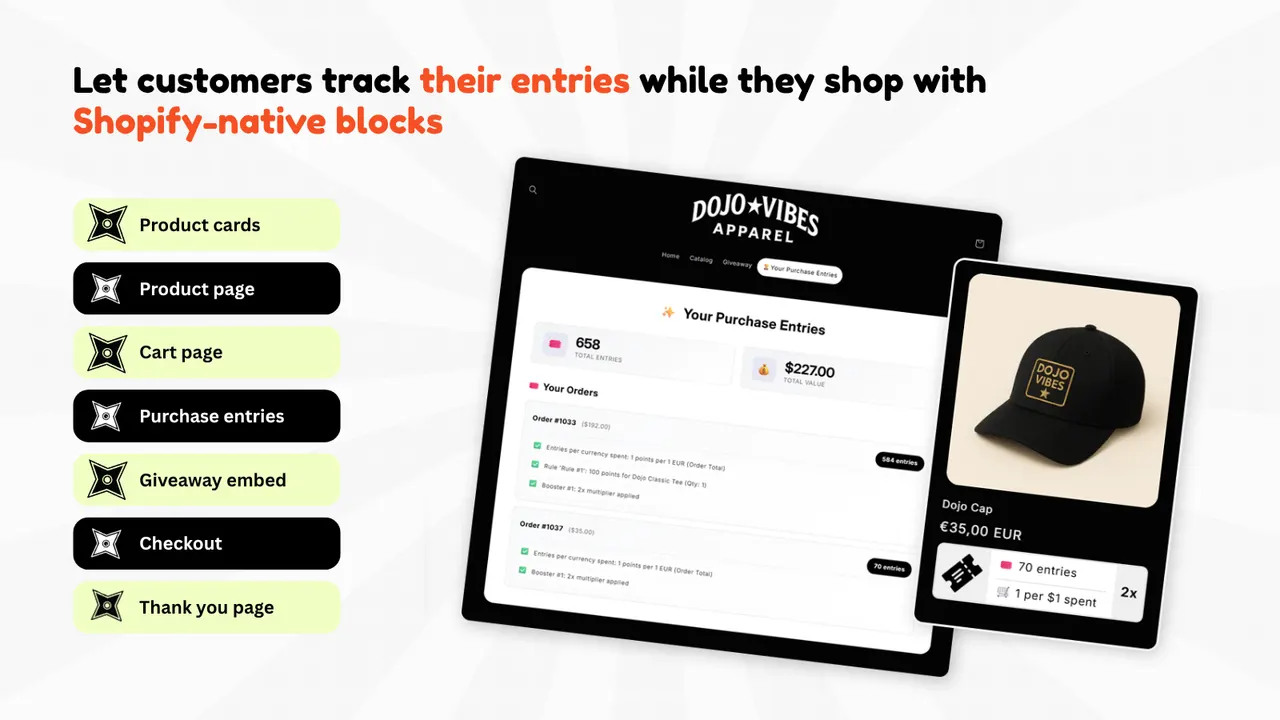
Caption: A purchase-based giveaway from the shopper's side in Giveaway Ninja's listing: a running entries panel with 658 total entries and a 1 point per $1 spent ×2 multiplier beside a product card showing 70 entries. (Image: Giveaway Ninja)
The mobile answer. On mobile, where most Q4 traffic lands, the same mechanic behaves differently in a native app. Shopney builds native iOS and Android apps without code, with push notifications, in-app campaigns and abandoned-cart recovery, from $149 a month with a free trial. Its honest limit: it suits stores with repeat customers, and a store whose customers buy once is usually better served by mobile web.
The evidence half. Judge.me Product Reviews collects reviews, photo reviews and star ratings on a free plan for unlimited reviews, and a review written in October still works next October, which a sold count cannot do. Telling a real review from a manufactured one is its own skill, and it has its own post here.
Where to start: pick one product that already sells, put a real sold count beside its Add to cart, and leave the discount popup off that page. Then test the popup on the product where the hesitation is genuinely about price.
| App | Best for | Free plan | Rating |
|---|---|---|---|
| PieceUp | A jigsaw discount popup that mints real single-use codes | Yes | No reviews yet |
| SSM Sold Counter Social Proof | Sold counts, best-seller badges and live cart activity | Yes, up to 10,000 monthly visitors | 5.0 (1) |
| Giveaway Ninja | Purchase-based giveaways where orders earn entries | Yes, 50 monthly users | 5.0 (89) |
| Shopney | A native iOS and Android app for repeat customers | No, from $149/month with a free trial | 5.0 (774) |
| Judge.me Product Reviews | Reviews, photo reviews and star ratings | Yes, unlimited reviews | 5.0 (48,439) |
Frequently asked questions
Is a gamified discount popup better than a plain one? Not automatically. A plain popup is faster and works on everyone who accepts it; a gamified popup asks for attention and pays it back with a prize. It usually wins while the shopper is still browsing, and the plain version wins when they are already decided.
Do puzzle popups annoy shoppers? They can. A puzzle is friction, and a shopper who wanted a code in one click may leave instead. The usual fix is a smaller grid: a 2x2 takes seconds and still earns the prize, while a 4x4 is for a store whose reward is worth the effort.
Does PieceUp create a real Shopify discount code? Yes. The code is minted the moment the shopper wins and appears under Discounts in your Shopify admin like any other code, so it is single use, it can be limited, and it can be disabled if something goes wrong.
How many puzzle pieces should a discount popup have? Start at 2x2 and move up only if completions hold. PieceUp allows 2x2 to 4x4 with three difficulty levels, so the piece count is a dial for how long the shopper spends with your product image, not a setting you get right once.
How do I measure whether a discount popup made money? Count revenue from the codes it issued rather than clicks. PieceUp counts opens, completions and rewards per puzzle, and an order placed with a code is matched back to the puzzle that issued it, so a discount can be judged against the margin it cost.
Credits and trademarks
PieceUp is built by PieceUp, Giveaway Ninja is built by CrazyRocket, Shopney is built by Shopney, and Judge.me Product Reviews is built by Judge.me. We do not build, own or make any of those apps. SSM Sold Counter Social Proof is the one app here that is ours.
The PieceUp, Giveaway Ninja, Shopney and Judge.me visuals are promotional images from each app's own Shopify App Store listing, credited to its owner beside the image. The SSM visual is from our own app's demo store. None is a screenshot of a customer's store, and inclusion is not an endorsement by those companies of anything we build.
Shopify is a trademark of Shopify Inc. All other product names, logos and brands are the property of their respective owners and are used for identification only. Ratings and review counts were read from the App Store listings on 13 October 2026 and change over time.
Disclosure: we build SSM Sold Counter Social Proof. The other apps in this post are made by other teams, and nobody paid for inclusion. This post is part of a Q4 series written with the teams behind those apps.
Apps in this post
PieceUp
A jigsaw discount popup that mints a real single-use Shopify code.
SSM Sold Counter Social Proof
Real sold counts, best-seller badges and live cart activity.
Giveaway Ninja
Purchase-based giveaways that turn orders and referrals into entries.
Shopney
No-code native iOS and Android apps for Shopify stores.
Judge.me Product Reviews
Collects product reviews, photo reviews and star ratings.
Related reading
- How to Show a Sales Counter Without a Popup
Social proof does not have to arrive as a corner toast. Here are the three places a sales counter can live on a Shopify page, and how to build each one.
- How to Tell Real Social Proof From Fake
Here is the one question that separates them from the ones that measure, and three ways a number can be real and still mislead.
- Shopify Social Proof for Q4: Sold Counts and Live Activity
Real sold counts, best-seller badges and live cart activity convince shoppers without inventing urgency — and every number can be traced to your own orders.