Shopify Social Proof for Q4: Sold Counts and Live Activity
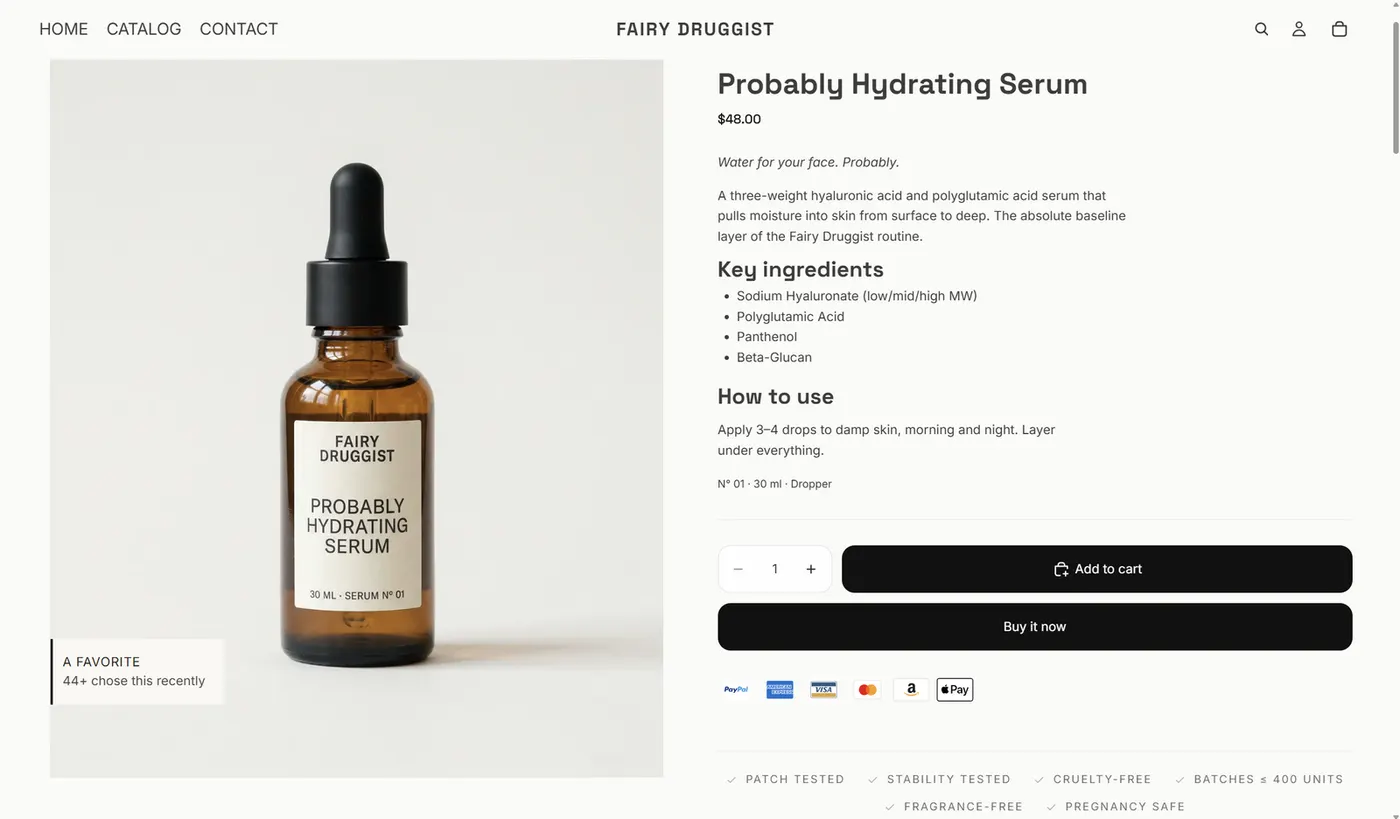
Getting your store ready for Q4 usually starts with the sale: choose the products, decide the discount, work on the ads.
Then the quieter problem shows up. Traffic arrives, people browse, and a good number of them leave without deciding. Not because the product is wrong, but because they are not sure yet.
Social proof is one answer to that. Here is how to use it honestly.
In short: social proof on Shopify means showing a shopper what other customers actually did — "23 sold today", a best-seller badge, "8 carted in the last hour". The numbers must come from your own orders and live traffic, never typed in by hand. Displayed honestly, they reduce the uncertainty that makes a shopper leave without deciding.
Why social proof works, and when it backfires
A shopper who has never heard of you is being asked to take a risk. Social proof reduces that risk by showing what other people did.
The catch is that the effect only holds while the number is believable. The moment a shopper suspects the count is invented, the proof turns into a reason to leave. This is why the source of the number matters more than its size.
The rule to hold: if you cannot point at the orders behind a number, do not show it.
That rule rules out most of what the category sells. Fake recent-purchase popups, "12 people are viewing this" on a product nobody is viewing, and urgency timers that reset when you reload the page are all still common. They work for a while, then they cost you the customer and, depending on where you sell, they cost you more than that. EU consumer rules now treat invented scarcity and unverifiable reviews as unfair commercial practices, and the same claim that boosts a conversion today is the one a regulator asks you to substantiate later.
Products with no orders are the second failure mode. A "0 sold" label, or a badge on a product that nobody bought, reads as an admission. If a product has no sales yet, the honest move is to leave it alone and let the collection-level proof carry it.
The third is volume. Every label you add is one more element competing for attention on a page that already has a price, a variant picker and two calls to action. Proof works best when there is one number, in one place, that the shopper actually reads.
Which numbers you can show
There are four kinds of proof worth considering, and they do different jobs:
- Sold counts — "23 sold today", "140 sold this month". Best on products that already have volume.
- Best-seller badges — ranked within a collection, so the label means something relative.
- Live cart activity — "8 carted in the last hour", "12 in cart now".
- Live visitor counts — useful on a busy store, thin on a quiet one.
Every one of these has to come from your own orders and traffic. If an app asks you to type the numbers in, it is the wrong app.
Two of the four have a shelf life that depends on traffic, and it is worth knowing which is which before you switch them on.
Sold counts scale with the product, not the day. A serum that sells four a day will show a respectable monthly number long after the daily number has gone quiet. If you have to choose one, choose the window that makes the number meaningful: daily counts flatter fast-moving products, monthly counts flatter steady ones.
Best-seller badges are relative, which makes them the only proof that works in a small catalogue. "Top seller in Treat" is true even if the winner sold twelve units. That is not a trick as long as the ranking is real and scoped to a collection the shopper can see.
Live cart activity is the strongest signal of the four when it is present, because it answers "is anyone else looking at this right now", which is the question a hesitant shopper is actually asking. It is also the one that disappears the moment your traffic does.
Live visitor counts are the weakest on their own and the most tempting to inflate. On a store with real traffic they add atmosphere around a product page. On a store with none, they are decoration.
| Proof type | Example | Best on | Honest limit |
|---|---|---|---|
| Sold count | "23 sold today" | Products with steady daily orders | Flatlines on slow movers; use a longer window |
| Best-seller badge | "Top seller in Treat" | Small catalogues and collections | Says nothing about absolute volume |
| Live cart activity | "8 carted in the last hour" | Busy product pages | Vanishes with traffic |
| Live visitors | "12 in cart now" | High-traffic stores | Weak proof alone; easiest to fake |
Where the proof should sit
Placement decides whether proof is seen at the moment of decision:
- On the product image, in collection grids, so it registers while browsing.
- Beside Add to cart, which is the moment the hesitation actually happens.
- On variant cards, if you split products by colour or size — each card can carry its own count. That is where Stamp Show Variants on Collection fits: if each colour gets its own card, each card can show its own sold count instead of one shared number.
The first two are not alternatives. A label on the image does the work of stopping the scroll in a collection grid; a label beside the button does the work of closing the decision on the product page. Stores that run both usually see the inline one carry more weight, because it arrives after the shopper has read the description and chosen a size.
The third is the one people miss. If your store splits a product into variant cards, that split is an opportunity: a sold count on a single shared product page averages every colour together, so a best-selling colour looks exactly as popular as the one nobody buys.
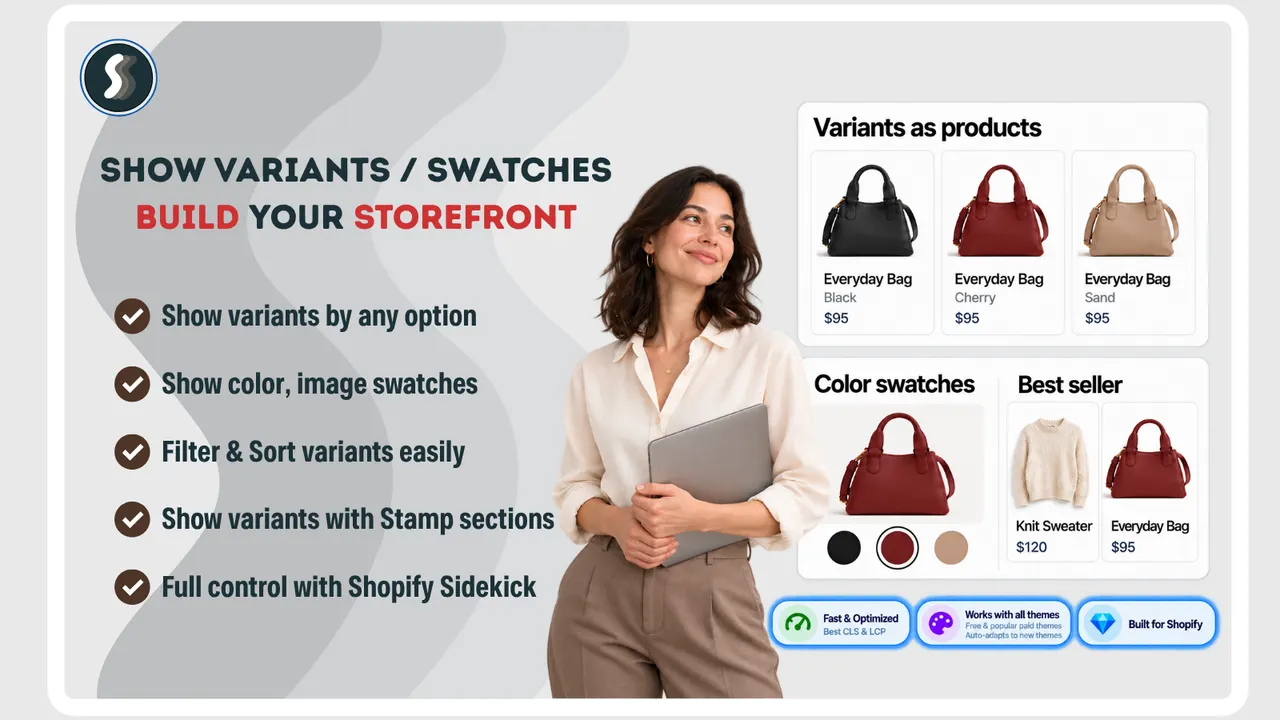
Caption: Stamp's own listing shows the split: the same bag three times, once per colour, each card with its own title and price. That is the surface a per-variant sold count needs. (Image: Stamp Show Variants on Collection)
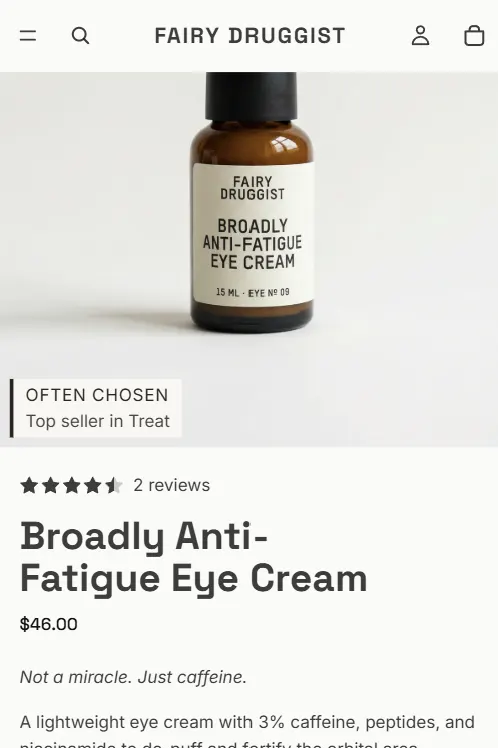
Match the label styling to your theme. Proof that looks bolted on reads as an advert. Labels that inherit your store's own font, size and spacing read as part of the page, which is the entire point.
How the label should look, and how it stays that way
The fastest way to make real proof look fake is to style it like a banner. A box with its own border, its own font and an accent colour nothing else on the page uses announces itself as an app.
The practical answer is to let the label inherit the store's design tokens: the same font family, the same weight, the same corner radius and the same neutral palette the theme already uses for badges. If the theme has a style preset for product labels, the proof should use it rather than invent a second one.
Two smaller decisions matter more than they look:
- Language. If you sell in more than one market, the label text needs to follow the storefront language. Proof in English on a German product page is a trust leak at the exact moment you are asking for trust.
- Placement on small screens. A label sized for a desktop collection grid can cover most of a product photo on a phone. Check the phone view first, because that is where most Q4 traffic lands.
How the app decides what to show
Once you have four kinds of proof and several places to put them, the question stops being "what should I show" and becomes "which one, on which product, today".
The usual answer is a set of manual rules: show sold counts on everything, hide them under a threshold, turn on the visitor count when traffic is high. Rules like that are work to maintain and they are wrong in predictable ways. A product with four sales and heavy traffic should show cart activity; a product with forty sales and one visitor should show the sold count. A threshold cannot tell those two apart.
A self-learning approach does: it weighs what is actually true for that product right now and shows the strongest available proof, rather than every proof you enabled. The result you are looking for is not more labels. It is one label that happens to be the right one on each page.
This is also where measurement belongs. What you want to know at the end of Q4 is whether the products carrying proof converted differently from the ones that did not, which is a comparison you can only make if the app knows which orders followed a label impression.
Pair proof with a reason to act
Proof answers "do other people buy this?". It does not answer "why now?".
Those are separate problems, and they need separate tools:
- For the shopper who is interested but drifting, a time-limited offer gives them a reason to finish today.
- If you would rather earn engagement than cut price, a purchase-based giveaway gives people a reason to take part without discounting the product — Giveaway Ninja turns orders, referrals and social actions into entries, which means the campaign pulls in orders while it runs instead of only collecting email addresses for later.
Running proof and urgency together works when both are true and both are yours. Real proof next to a real deadline is the strongest combination on a product page. Real proof next to a countdown that resets is worse than either one alone, because the shopper learns something about you in the second it takes them to notice.
One warning worth stating plainly: do not point a discount at a product that is already selling well without proof. You have paid for the traffic, the proof is free, and the discount comes out of the margin. Save the offer for the products where the hesitation is real.
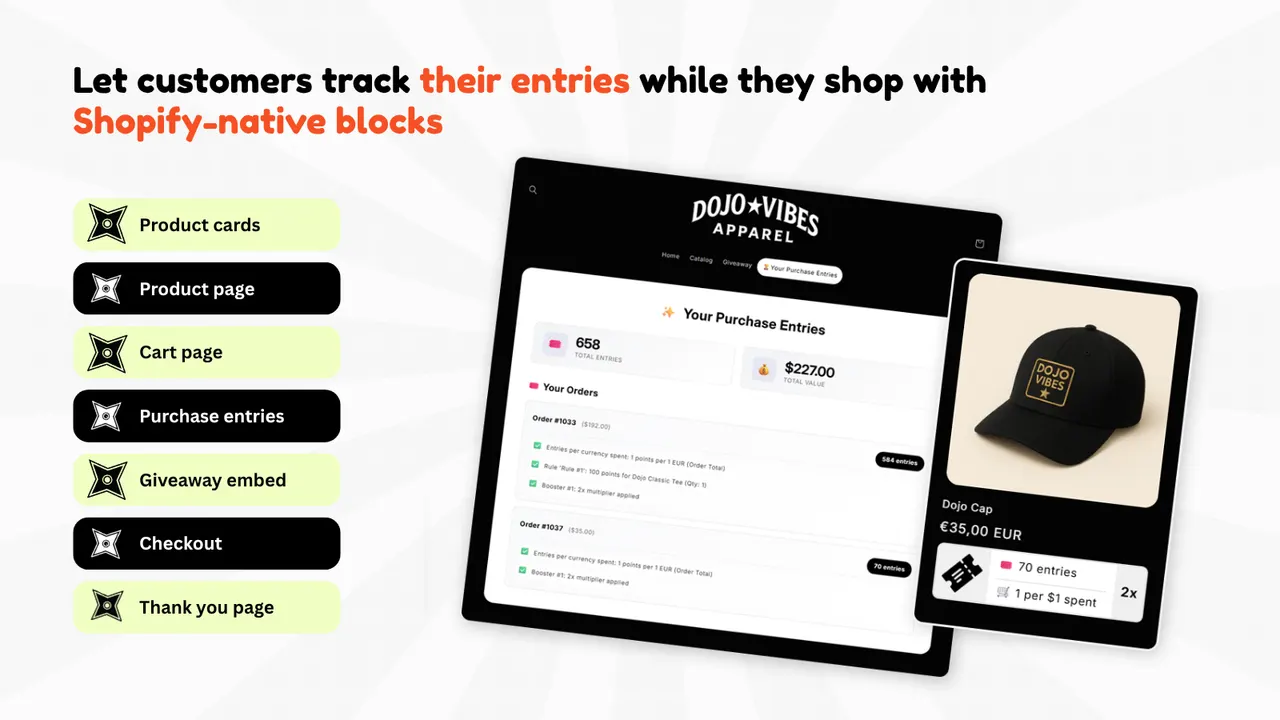
Caption: What a purchase-based giveaway looks like from the shopper's side: an entries panel they can check while they shop, with each order's entries and its multiplier shown. (Image: Giveaway Ninja)
Do not forget mobile
Most Q4 traffic lands on a phone, where a small badge can crowd the layout, and where a shopper who leaves is harder to bring back.
If a meaningful share of your customers buy more than once, a native app changes what you can do after the sale — notifications you control, and cart recovery that does not depend on an ad. Shopney is the option in this group. It is a paid commitment rather than a free plan, so the question is not "is a mobile app nice" but "do enough of my customers come back to justify owning the channel".
There is a version of this that costs nothing. Open your own product page on a phone and look at the first screen: how much of the product photo is left after the header, the announcement bar and whatever label is sitting on the image. If the proof has eaten the product, it is misplaced regardless of whether the number is true.
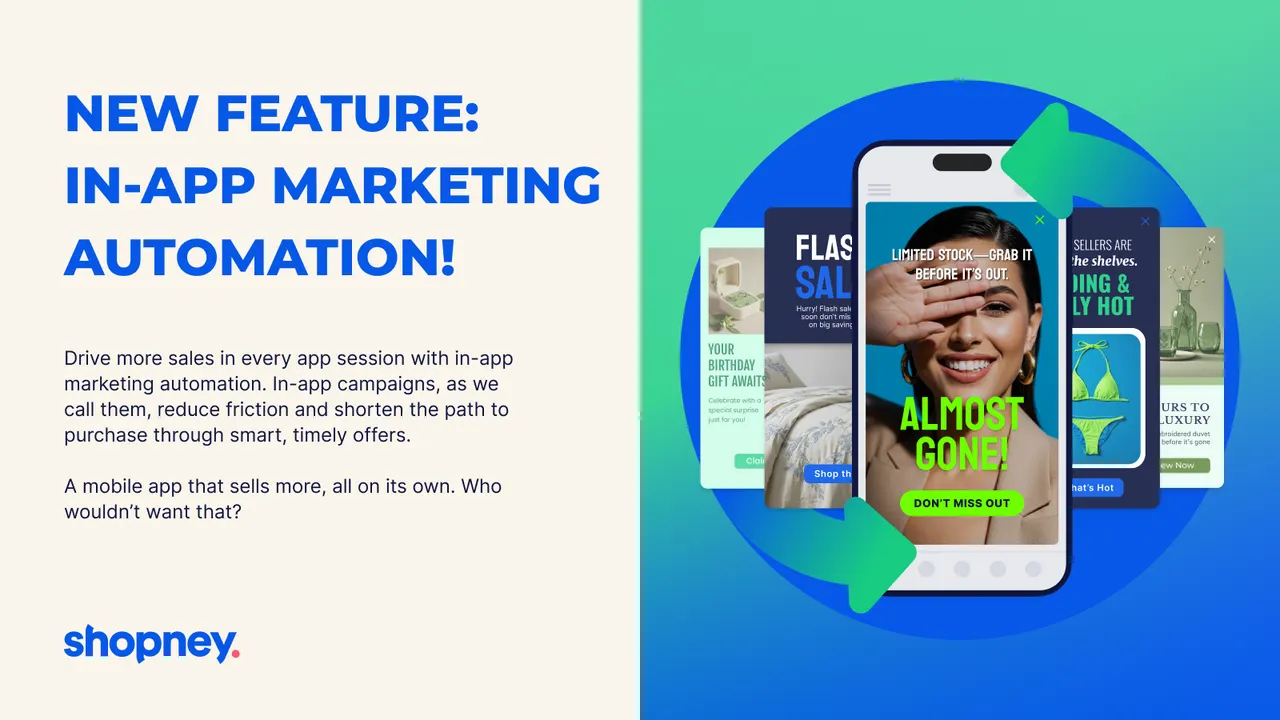
Caption: In a native app the same proof has a different job: it can arrive as an in-app campaign on a screen you own, instead of competing for space on the product page. (Image: Shopney)
Do reviews and sold counts do the same job?
No, and the difference decides where each one belongs. A review is evidence: it says a specific person bought this and had an opinion about it. A sold count is momentum: it says people are buying it now. Evidence answers "is this any good"; momentum answers "is this still moving".
The honest limit on each is what the other one covers. A product with forty reviews written over two years tells a shopper nothing about whether it sells today. A product with "140 sold this month" and no reviews asks them to trust a number with no faces behind it. If you have both, show the stars next to the count and let the two argue together. Telling a real review pattern from a fake one is its own skill, and it has its own post here.
Most stores already have the reviews half, or can get it for free: Judge.me Product Reviews collects reviews, photo reviews and star ratings, and has a free plan for unlimited reviews. Reviews also compound in a way counts cannot — a review written in October still works next October, while a sold count expires with the month. That is the case for collecting them even on products where you are not showing a counter yet.
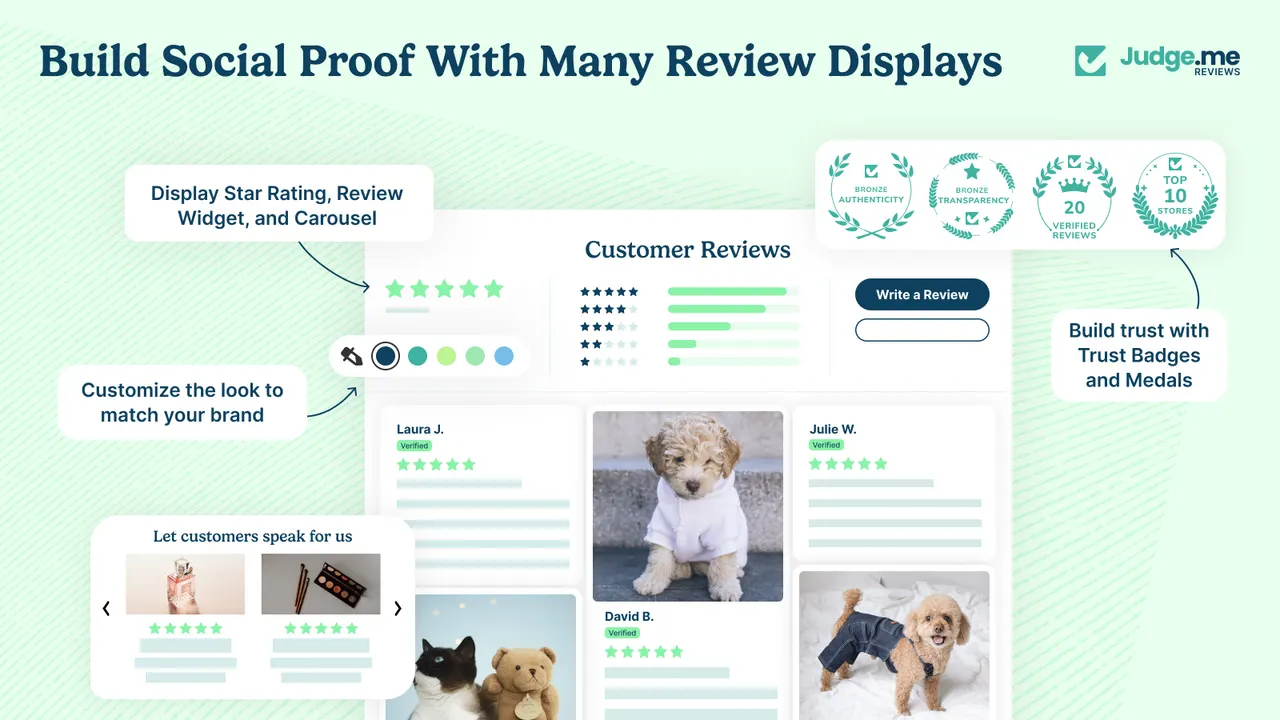
Caption: The evidence layer, as Judge.me renders it: star ratings and a distribution chart at the top of the reviews, photo reviews below, and trust badges beside them. (Image: Judge.me Product Reviews)
What social proof cannot fix
It is worth being clear about the boundary, because proof is often sold as a cure for problems it has no effect on.
- It does not fix a product page that fails to explain what the product is.
- It does not fix shipping costs discovered at checkout.
- It does not fix a catalogue where the same photo is doing duty for six variants, so the shopper cannot tell which one they are looking at. That is a merchandising problem, and the fix is assigning images per variant rather than adding a label on top of the confusion.
- And it does not protect your own product photography, which is the other thing stores lose in Q4. When your images are the reason a product page converts, the same images turn up on competitor listings, on marketplace copies and in ads you did not write. Watermarking the catalogue before peak season is cheap insurance, and it is the job Viking Product Image Watermark exists to do — batch-stamping a logo, a store name or a badge onto product photos so a copied image still points back at you.
None of those are social proof problems. Adding a sold count on top of them just makes the page busier.
Where to start
Pick one product that already sells. Show a real sold count on it, on the product page and in its collection. Leave it for two weeks and compare. If you want the mechanics of one specific number first, showing a sales counter without a popup walks through it.
Add the second number only when the first one has earned its place.
Frequently asked questions
Is showing a sold count on Shopify allowed? Yes, when the number is true. Shopify gives you the order data, so a count derived from real orders is defensible. A number you cannot substantiate is what creates a problem, with customers and with regulators.
Do sold counters actually increase conversion? They reduce uncertainty, which is one of the main reasons a shopper hesitates. They work best on products that already sell. On a product with no orders there is nothing honest to show, so leave it alone.
Should I show scarcity and social proof together? Only when both are true. A real low-stock count next to a real sold count is the strongest pairing on a product page. A fabricated version of either is the fastest way to lose trust.
What is the difference between a sold count and a best-seller badge? A sold count is absolute: 23 sold today. A best-seller badge is relative to a collection, so first place means the product outsold its neighbours, not that it sold a lot overall. Relative proof is the only kind that works in a small catalogue.
Does social proof work on a store with no sales yet? Not the sales-based kind. Live traffic and recent-visitor counts can still be true on a new store, but they are weak proof on their own. With no orders, spend Q4 earning reviews instead of displaying proof you cannot back up.
How long should I leave a social proof label before judging it? Two weeks on one product is enough to see the direction. Comparing whole-store revenue before and after will not tell you anything, because Q4 traffic is changing at the same time.
Credits and trademarks
The social-proof labels shown in this post are from the demo store of SSM Sold Counter Social Proof, the app we build. The Stamp, Giveaway Ninja, Shopney and Judge.me visuals are promotional images from each app's own Shopify App Store listing, used here to illustrate what the app does and credited to its owner beside the image; they are not screenshots of a customer's store, and inclusion is not an endorsement by those companies of SSM.
Shopify is a trademark of Shopify Inc. All other product names, logos and brands are the property of their respective owners and are used for identification only. Ratings and review counts were read from the App Store listings on 13 October 2026 and change over time.
Disclosure: we build SSM Sold Counter Social Proof. The other apps in this post are made by other people, and we were not paid to include them.
Apps in this post
SSM Sold Counter Social Proof
Real sold counts, best-seller badges and live cart activity.
Giveaway Ninja
Purchase-based giveaways that turn orders and referrals into entries.
Shopney
No-code native iOS and Android apps for Shopify stores.
Stamp Show Variants on Collection
One card per variant on collection and search pages.
Judge.me Product Reviews
Collects product reviews, photo reviews and star ratings.
Related reading
- How to Tell Real Social Proof From Fake
Here is the one question that separates them from the ones that measure, and three ways a number can be real and still mislead.
- How to Show a Sales Counter Without a Popup
Social proof does not have to arrive as a corner toast. Here are the three places a sales counter can live on a Shopify page, and how to build each one.
- Shopify Discount Popups: Gamified vs Plain Compared
A plain discount popup hands 10% to anyone who scrolls past. A jigsaw asks for thirty seconds and gives the code to someone who just looked at your product.