A Shopify Giveaway That Drives Revenue, Not Just Emails
Most Shopify giveaways are built to collect email addresses: the shopper types one into a popup, waits a week, and one person wins. Nothing in that exchange touches what a Q4 campaign is meant to produce, which is orders.
A giveaway built on entries works differently. Entry is earned — an order, a referral, a share, a photo — so the draw is still random and the prize is still real, but the campaign produces orders while it runs.
This post covers what earns an entry, how to run one for a launch, how to raise order value with it, where it lives on the storefront, and what the rules ask before you open entries.
In short: a giveaway that drives revenue
A revenue-driving giveaway ties entries to orders, referrals and spend thresholds rather than asking only for an email. Giveaway Ninja is the app in this group: extra entries per dollar spent, bonus rules for bundles and specific products, date-range multipliers for launch and final hours, and an entries panel a shopper can see while they shop.
The rest of this post is the mechanics, plus the two decisions that matter: what earns an entry, and what you do with the people afterwards.
What is the difference between a giveaway and a sweepstakes for a store?
A sweepstakes is a prize draw where the winner is chosen at random and, in most places, buying something cannot be a condition of entry. A giveaway, as the Shopify apps use the word, is that draw with purchase-based entries added on top.
Three words get used loosely. A sweepstakes is random, with no purchase necessary. A contest is judged on skill, such as the best photo, and carries its own rules. A giveaway is the everyday use: a prize draw where entries are earned by doing things, with a free route alongside the purchase-based ones.
The honest limit: the free route is not a formality to bury in the terms. It is what keeps a prize draw a prize draw.
How do entries work?
An entry is an action the app records against a named shopper: an order, a referral, a social action, a photo submission — plus a way to enter without buying, which most markets expect and which should be stated where entries are collected.
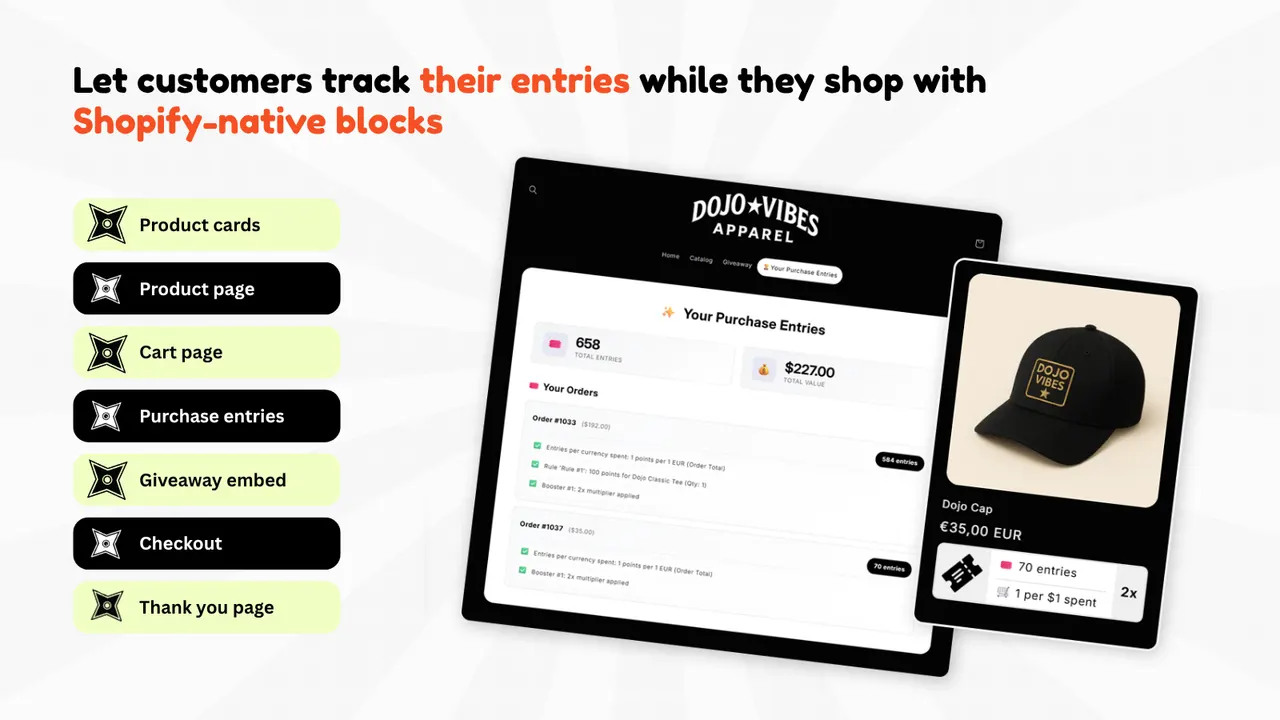
- Orders. The base entry, and the one that makes this a revenue campaign rather than a list-building exercise. Giveaway Ninja awards extra entries per dollar spent — its listing shows one point per $1 spent with a ×2 multiplier.
- Referrals. Share a link, earn entries when a friend orders — the only entry type that borrows someone else's audience.
- Social actions. Following, sharing or tagging, usually one-time or daily, and useful for reaching people who are not on your list.
- Photo submissions. The shopper uploads a photo of the product in use: content harder to fake than a review.
- A way in without buying. The free route, findable rather than buried in the terms.
Caption: What entries look like to the shopper: 658 total entries, the $227.00 of sales behind them, and the earning rate — one point per $1 spent with a ×2 multiplier. (Image: Giveaway Ninja)
The honest limit: a free route anyone can repeat all day fills the draw with people who will never buy; one nobody can find is a purchase requirement with extra steps.
How do you run a giveaway for a product launch?
Point the giveaway at one product or variant and attach a date-range multiplier so entries earned inside the launch window are worth more. The first orders land while attention is highest, the new product shows real sales rather than a zero, and you finish with a campaign number.
- Target what you are launching. Entries should accrue on the new product or variant, not the store in general. A gift-card giveaway teaches nobody about the product you are establishing.
- Use a date-range multiplier. Early buyers earn more, which is a reason to order in week one. Giveaway Ninja supports multipliers for launch windows and final hours specifically.
- Make the prize the launched product. Then the campaign and the product ad tell one story, and the winner becomes the first real photograph of the thing in someone's hands.
A product with real orders behind it also has something honest to display, and how to show units sold on a Shopify product page covers that side.
The honest limit: a launch giveaway pulls in entry-hunters, and some will never buy. Read it on orders placed by entrants, not the entry count.
How do you use a giveaway to raise order value?
Stack bonus rules on the base earning rate so a bigger cart earns more entries: extra entries per dollar spent, a bonus for buying a bundle, and a threshold bonus above a spend level. Each rule is a reason to add one more item before checkout.
- Extra entries per dollar. The base multiplier, and the one that makes the spend ladder legible: a shopper comparing a bigger basket with a smaller one can see the difference in entries.
- A bundle bonus. Bonus entries for the set rather than the single item, making the bundle the entry-maximising choice.
- A spend threshold. Set it just above where an ordinary order lands, so it is reachable rather than decorative — a threshold nobody crosses is a rule you wrote for yourself.
- Product targeting. Bonus entries on a specific product or variant, pointing the multiplier at what you want to move.
A discount spends margin on every order; a giveaway spends a fixed prize cost and gives the shopper something to win. If the shopper is hesitating rather than entry-hunting, a time-limited offer is the sharper tool.
The honest limit: a multiplier on spend rewards your biggest spenders, so the threshold has to be reachable. Otherwise you have added a loyalty perk, not an order-value campaign.
Where does the giveaway live?
The campaign is hosted on a branded landing page, as a popup, or as an embed on your own pages. Entries then stay visible while the shopper shops, through Shopify-native blocks on product cards, the product page, the cart, the checkout and the thank-you page.
- A branded landing page is the URL you put in ads, email and social posts, and the one place the campaign can be explained properly.
- A popup captures people already on the storefront — the cheapest way to start collecting entries, and the most likely to collide with everything else you run.
- An embed puts the entries panel inside the store, so the campaign has no separate destination.
- The native blocks are what make this a revenue mechanic. A product card showing 70 entries tells a browsing shopper this product is part of something. A block on the cart or checkout reminds them that ordering now earns entries at the moment they decide; the thank-you page is where the entry lands.
The honest limit: the free plan covers 50 monthly users, enough to test the mechanic and not enough for a busy Q4 campaign.
Prize, rules and picking a winner
Pick the winner with a random draw, keep the evidence, publish the rules and the entry period before entries open, and announce the result where entrants can see it. A draw that cannot be evidenced is the part most likely to be challenged.
- Write the rules first. Who may enter, where they must live, when entries open and close, what earns entries, and how the winner is chosen and told.
- Run the draw in public. Giveaway Ninja includes a built-in live draw that picks winners at random. Running it live, or recording it, answers the question every entrant asks privately.
- Keep the record. The entry list and the draw result.
- Fulfil it visibly. A photograph of the winner with the prize is content for the next campaign.
The honest limit: random means random. Steering a draw towards a photogenic winner is the kind of decision that surfaces in a comment thread.
Check your local rules before you launch
Giveaway and sweepstakes rules vary by country. How a winner may be selected, whether a purchase can be required, what a no-purchase entry route looks like, and whether a larger prize pool must be registered all differ, and platform rules sit on top of the law. We are not lawyers; check your own market.
- The free route. In many markets a prize draw that requires payment to enter is a lottery rather than a promotion, and a genuine free entry method separates the two. It has to be as findable as the paid route.
- The platform. Instagram's promotion guidelines put responsibility for the promotion on the promoter and set their own conditions for how it may be run, so a giveaway on Instagram has two rulebooks.
- Data. Entry data is personal data. Say what you will do with it, then do only that.
- Age, location and the prize. Prizes generally cannot go to minors, campaigns are often restricted to specific countries, and some prizes bring their own conditions.
That is the same discipline as a sold count you can substantiate: the problem is never the campaign, it is the claim you cannot evidence. How to tell real social proof from fake makes that argument about product pages.
What to do with the audience afterwards
A giveaway produces a list of people who have already acted on your store. That is the start of the relationship, not the end: the entrants who did not buy need a reason to come back, the customers who did need a reason to return, and the campaign report tells you which group you ended up with.
The entrant who never bought is the group most stores lose. Growth Suite is built for that person: it watches shopping behaviour to find visitors who are still deciding, then gives them a personal discount code with a countdown. The pattern worth copying is the pairing — run the giveaway to bring people in, pair the giveaway with a time-limited offer and the deadline does the closing.
The customers who did buy deserve a different follow-up, and it is one a giveaway cannot do: bring people in with the giveaway, then keep them on a channel you own. Shopney builds native iOS and Android apps for Shopify and Shopify Plus without code, with unlimited push notifications and in-app campaigns. Its listing puts the starting price at $149/month with a free trial, and the honest limit is structural: it suits stores with repeat customers, while a store whose customers buy once is usually better served by mobile web.
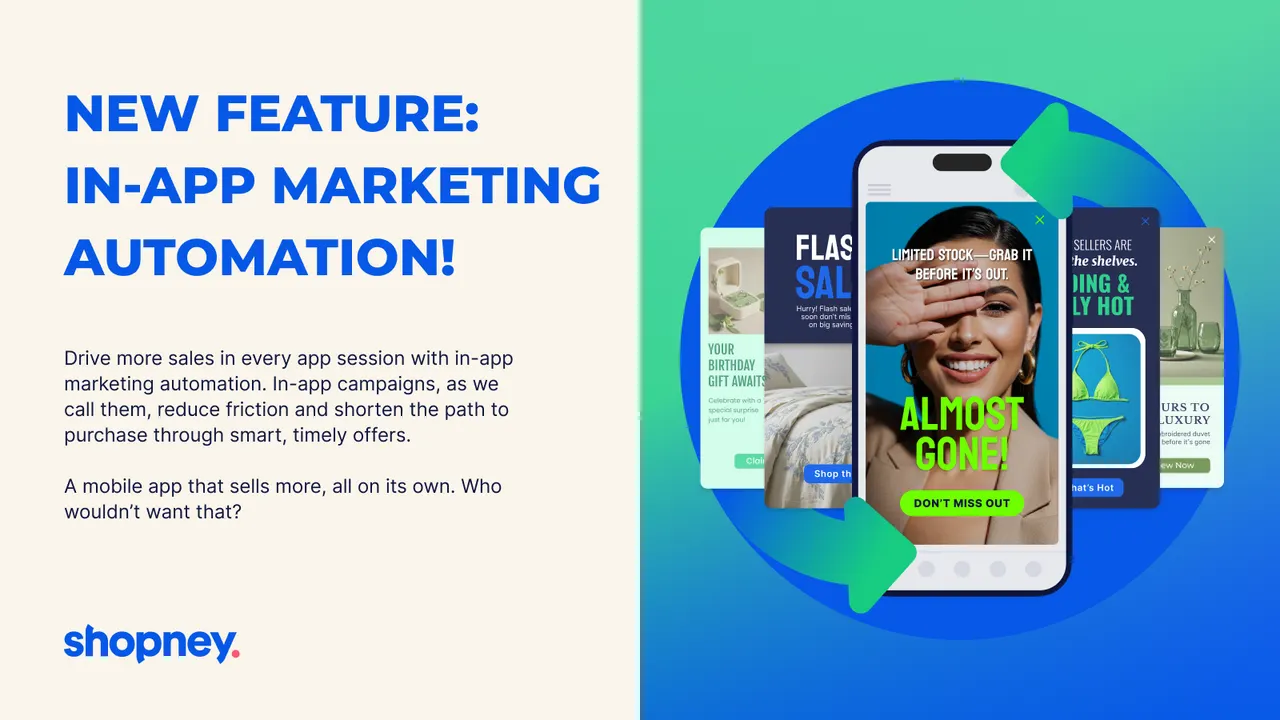
Caption: The channel a giveaway cannot reach: Shopney's listing shows in-app campaigns on a phone, arriving on a screen the store owns. (Image: Shopney)
Then the prize itself. If the prize is a personalised product, the winner still needs a way to submit their details. Mini: Custom Fields adds text, dropdown, date picker, file upload and swatch inputs to the product page, and saves every answer with the order.
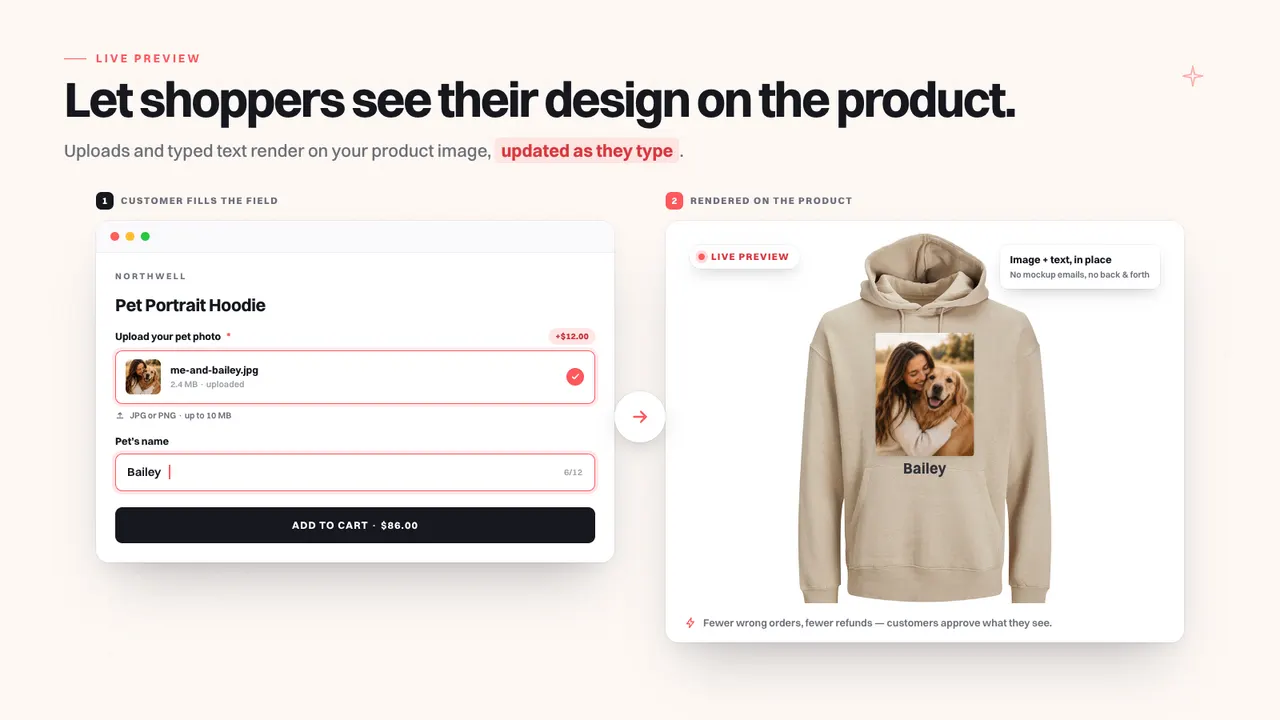
Caption: Where a personalised prize gets its details: Mini: Custom Fields' listing shows an uploaded photo and a typed name rendering on the product image as the customer types. (Image: Mini: Custom Fields)
And one from the opposite end. An entrant who did not win still liked you enough to type their email address, and asking them to review an order they placed is a smaller ask than another competition. Judge.me Product Reviews collects reviews, photo reviews and star ratings.
If you do one thing: open entries on a single product, tie the earning rate to orders and spend rather than sign-ups, and judge the campaign on the sales attached to entries.
| App | Best for | Free plan | Rating |
|---|---|---|---|
| Giveaway Ninja | Orders, referrals and spend thresholds as entries, with a live draw | Yes, up to 50 monthly users | 5.0 (89) |
| Shopney | A native iOS and Android app for stores with repeat customers | No, from $149/month with a free trial | 5.0 (774) |
| Growth Suite | Personal, time-limited offers for visitors who are still deciding | No, 14-day trial | Not shown |
| Mini: Custom Fields | Names, photos and dates on the product page, saved with the order | Yes | 5.0 (142) |
| Judge.me Product Reviews | Reviews and photo reviews after the campaign | Yes, unlimited reviews | 5.0 (48,439) |
Frequently asked questions
How do you run a giveaway on Shopify? Tie entries to actions your store can record: an order, a referral, a social share, a photo submission, plus a free way in. Giveaway Ninja hosts the campaign on a branded landing page, a popup or an embed, and shows a shopper their entries while they shop.
Is a giveaway the same as a sweepstakes? Practically, yes, when the winner is chosen at random. A sweepstakes is a prize draw you enter without buying anything, and in most markets purchase cannot be a condition of entry. Giveaway apps add purchase-based entries on top of that free route.
Can I require a purchase to enter a giveaway? In many countries, no. A random prize draw has to be enterable without buying, which is why a free entry method matters. The rules differ by market and platform, so check yours.
Do giveaways actually bring in revenue? A purchase-based one can, because entries are earned with orders rather than only with an email address. Giveaway Ninja shows the entries a shopper earned from each order and the sales behind them.
How do you pick a giveaway winner fairly? Use a random draw and keep the evidence: Giveaway Ninja includes a built-in live draw. Publish the rules, the entry window and the prize before entries open.
Credits and trademarks
Giveaway Ninja is built by CrazyRocket, Shopney by Shopney, Growth Suite by Growth Suite, Mini: Custom Fields by Minimate, and Judge.me Product Reviews by Judge.me. We do not build, own or make any of them. The visuals from Giveaway Ninja, Shopney and Mini: Custom Fields are promotional images from each app's own Shopify App Store listing, credited to its owner beside the image; they are not screenshots of a customer's store, and inclusion is not an endorsement.
Shopify is a trademark of Shopify Inc. All other product names, logos and brands are the property of their respective owners and are used for identification only. Ratings and review counts were read from the App Store listings on 13 October 2026 and change over time.
Disclosure: we build SSM Sold Counter Social Proof, which appears in the app list at the end of this post but is not discussed in it. The apps here are made by other teams, and nobody paid for inclusion.
Apps in this post
Giveaway Ninja
Purchase-based giveaways that turn orders and referrals into entries.
Shopney
No-code native iOS and Android apps for Shopify stores.
Growth Suite
Personalised, time-limited offers for shoppers who hesitate.
Mini: Custom Fields
Personalisation inputs on the product page, saved with the order.
Judge.me Product Reviews
Collects product reviews, photo reviews and star ratings.
Related reading
- How to Show Units Sold on a Shopify Product Page
Shopify has no built-in way to display units sold on a product page. Here are the three ways to do it, what each one costs, and when each one breaks.
- How to Tell Real Social Proof From Fake
Here is the one question that separates them from the ones that measure, and three ways a number can be real and still mislead.
- Shopify Social Proof for Q4: Sold Counts and Live Activity
Real sold counts, best-seller badges and live cart activity convince shoppers without inventing urgency — and every number can be traced to your own orders.